
voxl-osd
Renders the on-screen telemetry overlay for FPV video as MSP DisplayPort text, sent to voxl-vtx or an HDZero VTX.
Table of contents
- Overview
- Data Flow
- voxl-configure-osd
- Configuration File
- OSD Menu
- External Flight Controller (MSP)
- HDZero Output
- Debugging
- Source Code
Overview
voxl-osd draws the on-screen display (OSD) for FPV video: battery, RC link, flight mode, arm state, position, heading, VIO state, VTX temperature and power, and warnings. It does not touch video pixels. It lays out a character-cell text canvas and streams it as MSP DisplayPort commands, which the video transmitter composites over the live video. On ModalAI FPV products the consumer is voxl-vtx; the same canvas can also be sent over UART to a third-party HDZero VTX.
Since voxl-osd 1.0.0 the service also sends structured MSP messages on the same output: MSP_VOXL_TELEM (190, flight, power, and status data at about 10 Hz), MSP_VOXL_STRINGS (191, craft name and other strings at about 2 Hz and on change), and MSP_VOXL_MENU (192, the menu state and rows). voxl-vtx relays them to the VRX, which in SDK 1.8.0 draws its own OSD from them. The character canvas is still sent, so older receivers keep working.
voxl-osd 1.2.0 (SDK 1.8.0) uses version 2 of
MSP_VOXL_STRINGS, and voxl-vtx 3.3 requires it. Run the same SDK version on the drone and the VRX Ground Unit.
The service also owns the OSD menu, a stick-driven menu shown in the goggles for changing flight modes, failsafe behavior, logging, and VTX settings without a ground station.
voxl-osd is enabled by voxl-configure-mpa on FPV SKUs such as Stinger and the VTX Air Unit, and disabled by default everywhere else. It runs as the systemd service voxl-osd.service, starting after voxl-px4 (without requiring it) and restarting automatically.
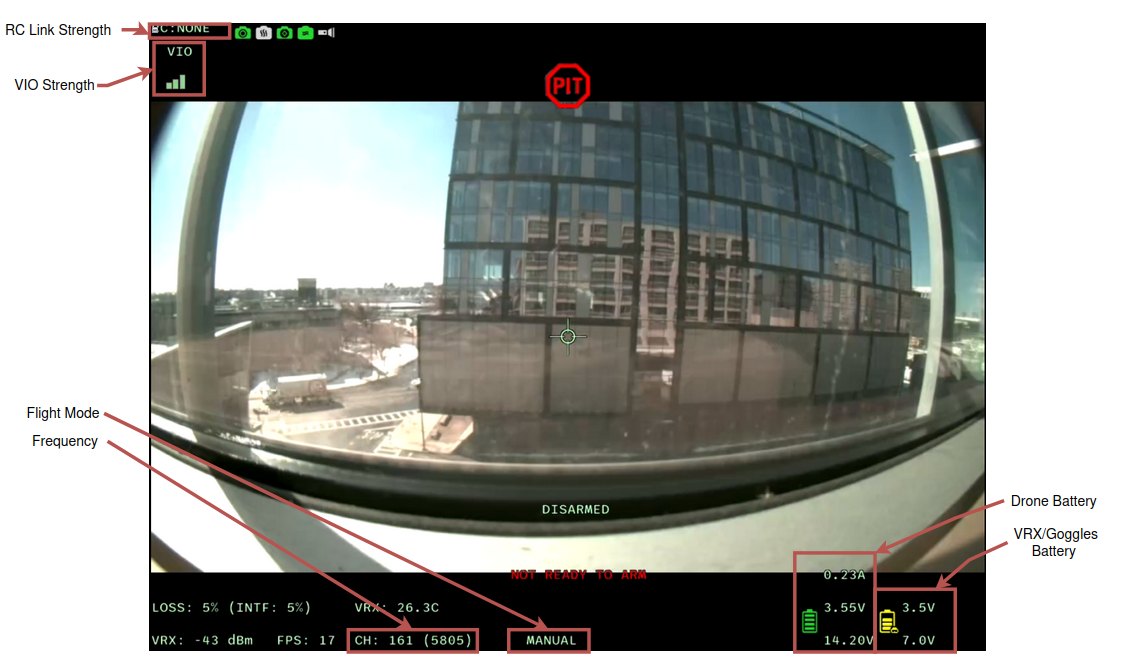
Data Flow
By default the service reads everything it displays from MPA pipes and writes the finished canvas to one output pipe.
| Pipe | Direction | Used for |
|---|---|---|
mavlink_onboard | in | PX4 telemetry from voxl-mavlink-server: battery, attitude, GPS, RC channels, arm state, flight mode |
mavlink_from_gcs | in | MANUAL_CONTROL from the ground, so the menu also responds to a joystick sent over IP |
ov, qvio | in | VIO quality from voxl-open-vins-server or voxl-qvio-server |
vfc | in | Assisted flight mode state from voxl-vision-hub, shown instead of PX4’s “OFFBOARD” |
vtx_latency | in | VTX temperature, TX power, and link stats from voxl-vtx |
cpu_stats2 | in | CPU and memory usage from voxl-cpu-monitor, for the optional usage lines and overload warnings |
payload_status | in | Optional payload arm and position strings shown at the top right |
msp_osd | out | MSP DisplayPort packets consumed by voxl-vtx |
msp_ext_fc_status | out | Arm state of an external flight controller, published only in MSP input mode |
In external flight controller mode (see below) the MAVLink, VIO, and VFC inputs are replaced by an MSP UART link to the other flight controller.
voxl-configure-osd
voxl-configure-osd writes /etc/modalai/voxl-osd.conf and enables or disables the service. It must be run as root.
voxl-configure-osd factory_enable              # reset the config to defaults and enable
voxl-configure-osd factory_enable_no_compass   # defaults with the compass tape and degrees hidden
voxl-configure-osd external_fc                 # take input from an external MSP flight controller over UART
voxl-configure-osd hdzero                      # send the canvas over UART to an HDZero VTX
voxl-configure-osd enable                      # enable the service without touching the config
voxl-configure-osd disable                     # stop and disable the service
external_fc and hdzero pick the UART by platform:
| Platform | external_fc input port | hdzero output port |
|---|---|---|
| M0054, M0154 (VOXL 2) | /dev/ttyHS1 | /dev/ttyHS1 |
| M0104, M0204 (VOXL 2 Mini) | /dev/ttyHS0 | /dev/ttyHS0 |
| M0197 | /dev/ttyHS7 | none |
Other platforms fall back to /dev/ttyHS1 for input and leave the output port empty; on M0197, set output_port by hand for hdzero. Edit input_port or output_port in the config file if your wiring differs.
Configuration File
/etc/modalai/voxl-osd.conf is JSON. It is created with defaults the first time the service runs, and any missing keys are added with their defaults on load. To print the loaded values without starting the service:
voxl-osd -c
Input and Output
| Field | Default | Meaning |
|---|---|---|
input_protocol | 1 | 1 = MAVLink, 2 = MSP |
input_type | 1 | 1 = MPA pipes, 2 = UART |
input_port | "" | UART device when input_type is 2 |
output_type | 1 | 0 = none, 1 = MPA (to voxl-vtx), 2 = UART (HDZero), 3 = both |
output_port | "" | UART device when output includes UART |
emit_canvas | true | Emit the DisplayPort text canvas on the MPA output. UART output is never gated by this |
resolution | 1 | Canvas size in character cells: 0 = SD 30x16, 1 = HD 50x18, 2 = HD 30x16, 3 = HD 53x20 |
font_type | 0 | Font index reported to the VTX |
Display Toggles
| Field | Default | Meaning |
|---|---|---|
show_compass_tape | true | Scrolling compass tape along the top of the canvas |
show_compass_degrees | true | Numeric heading in degrees. Shown even when the tape is off |
compass_fov_deg | 120 | Field of view of the compass tape |
show_mgrs | true | MGRS grid reference line |
mgrs_precision | 5 | MGRS digits per axis, 0 to 5 |
craft_name | "" | Free-text craft name drawn on the canvas |
show_vtx_cpu_mem_usage | false | VTX CPU and memory usage lines |
show_vrx_stream_stats | false | VRX stream statistics |
show_vio_overlay | false | VIO overlay |
show_thermal_flow | false | Thermal flow status |
show_mavlink | false | Saved state of the ADVANCED > MAVLINK FWD menu row, which turns MAVLink telemetry forwarding on the VTX on or off |
Element Positions
Every movable element has a *_col / *_row pair giving its character cell, origin top left. Set either value to -1 to hide the element. Defaults are for the HD 50x18 canvas.
| Element | Fields | Default (col, row) |
|---|---|---|
| RC link RSSI | rssi_col, rssi_row | 0, 0 |
| Compass tape | compass_col, compass_row | 22, 0 |
| VIO state | vio_col, vio_row | 1, 1 |
| Payload actuator state | payload_actuator_col, payload_actuator_row | 42, 2 |
| Payload status | payload_status_col, payload_status_row | 42, 3 |
| Craft name | craft_name_col, craft_name_row | 10, 3 |
| VTX temperature | vtx_temp_col, vtx_temp_row | 0, 4 |
| VTX TX power | vtx_dbm_col, vtx_dbm_row | 0, 5 |
| VTX CPU usage | vtx_cpu_usage_col, vtx_cpu_usage_row | 0, 6 |
| VTX memory usage | vtx_mem_usage_col, vtx_mem_usage_row | 0, 7 |
| Crosshair | crosshair_col, crosshair_row | 26, 8 |
| Velocity | velocity_col, velocity_row | 47, 13 |
| Altitude | altitude_col, altitude_row | 47, 14 |
| Distance and direction to home | to_home_col, to_home_row | 39, 14 |
| VTX overheat warning | vtx_overheat_warn_col, vtx_overheat_warn_row | 0, 14 |
| VTX overheat critical | vtx_overheat_crit_col, vtx_overheat_crit_row | 0, 15 |
| MGRS grid reference | mgrs_col, mgrs_row | 39, 15 |
| Armed / disarmed | disarmed_col, disarmed_row | 25, 15 |
| VTX CPU overload warning | vtx_overload_col, vtx_overload_row | 0, 16 |
| Latitude | latitude_col, latitude_row | 46, 16 |
| Status text | status_col, status_row | 24, 17 |
| VTX memory warning | vtx_mem_leak_col, vtx_mem_leak_row | 0, 17 |
| Longitude | longitude_col, longitude_row | 46, 17 |
| Flight mode | flight_mode_col, flight_mode_row | 24, 19 |
Current draw, pack voltage, and per-cell voltage are pinned to the bottom right (column 43, rows 17 to 19) and cannot be moved.
Menu and Flight Mode Fields
| Field | Default | Meaning |
|---|---|---|
menu_up_threshold | 1550 | Pitch stick value (us) above which the cursor moves up |
menu_down_threshold | 1450 | Pitch stick value below which the cursor moves down |
menu_right_threshold | 1550 | Roll stick value above which a value is incremented |
menu_left_threshold | 1450 | Roll stick value below which a value is decremented |
fltmode1_pset_mode, fltmode4_pset_mode, fltmode6_pset_mode | 0 | VFC assisted mode assigned to each flight-mode switch position, written by the Flight Mode menu |
shortcut | "OPT_A" | Unused, kept for compatibility |
Menu thresholds were 1650 / 1350 / 1850 / 1150 in voxl-osd 0.4.x. Versions from 1.0.0 on use the values above, so the menu needs less stick travel.
OSD Menu
With the vehicle disarmed, hold yaw up, throttle down, roll down, pitch down to open the menu. It always opens at the main menu. Pitch up and down moves the cursor. Roll left and right changes the value on the selected row or enters the highlighted submenu. Submenus end with BACK, EXIT (discard), and SAVE AND EXIT rows; the main menu ends with EXIT and SAVE AND EXIT. When flying over IP with voxl-joystick-server instead of an RC link, the same inputs come from the joystick.
| Menu | Rows | What it changes |
|---|---|---|
| Main | CHANNEL, PROFILE, PIT, FLIGHT MODE, ADVANCED, VRX SETTINGS, EXIT, SAVE AND EXIT | CHANNEL sets the VTX frequency (2.4 GHz channels 1 to 14, 5 GHz channels 36 to 173, up to 5865 MHz). PROFILE picks a VTX video profile. PIT turns PIT mode on or off. VRX SETTINGS hands the sticks to the VRX’s own settings menu (SDK 1.8.0 VRX, see VRX SETTINGS Menu) |
| Flight Mode | FLIGHT MODE, SWITCH VALUE | Assigns a mode to the switch position currently selected on the transmitter. Writes COM_FLTMODE* and PSET_MODE and pushes a live SET_MODE over MAVLink. Modes that need GPS are hidden when SYS_HAS_GPS is off. Not shown for an external flight controller |
| Advanced | RECORD TO LOCAL, MAVLINK FWD, BAT CELLS, LOGGING, AR WAYPOINTS, RC CHANNELS, FAILSAFE, ELRS | RECORD TO LOCAL toggles local video recording on the VTX. MAVLINK FWD turns MAVLink telemetry forwarding to the VRX on or off. BAT CELLS (1 to 12, default 4) writes the PX4 parameter BAT1_N_CELLS so the VRX can show per-cell voltage. FAILSAFE appears only with PX4 over MPA |
| Logging | VOXL-LOGGER-AUTO, DEBUG LOG | Toggles automatic voxl-logger recording on arm, and sets the VTX debug log to DISABLED, ENABLED, or ON ARM via voxl-send-command vtx_latency debug_log |
| RC Channels | live table | Read-only view of every RC channel value |
| Failsafe | RC LOSS TIME, RC LOSS ACT, RC FINAL DELAY, RC FINAL ACT, GCS LOSS TIME, GCS LOSS ACT | Writes COM_RC_LOSS_T, NAV_RCL_ACT, COM_RCL_ACT_T, COM_RCL_ACT, COM_DL_LOSS_T, and NAV_DLL_ACT. Actions: AUTO RTL, AUTO LAND, HOLD, TERMINATE, DISARM, DESCEND, plus DISABLED for GCS loss |
| ELRS | Custom Domain RX | ELRS receiver option, voxl-osd 0.4.15 and later |
| AR Waypoints | HOME WAYPOINT, LOCATION WAYPOINTS | Augmented-reality waypoint markers on the video, voxl-osd 1.1.0 and later. Enabling them checks the camera extrinsics for the vehicle; Stinger and the VTX Air Unit are not supported and show UNSUPPORTED VEHICLE SKU |
FLIGHT MODE on the main menu, like FAILSAFE, appears only with PX4 over MPA. The VTX settings behind CHANNEL, PROFILE, and PIT are described in the VTX Air Unit Software Guide.
External Flight Controller (MSP)
The VTX can act as the digital video system for a non-VOXL flight controller that speaks MSP over UART, such as Betaflight:
voxl-configure-osd external_fc
This sets input_type to UART and input_protocol to MSP. The service then polls the external flight controller at 20 Hz for RC channels, status, box IDs, battery, analog, and GPS, renders the OSD from those, and publishes the arm state on msp_ext_fc_status. No MAVLink or PX4 is involved. Wiring and cable options are in the VTX Air Unit Quick Start Guide.
HDZero Output
To drive a third-party HDZero VTX instead of, or as well as, voxl-vtx:
voxl-configure-osd hdzero
This sets output_type to UART and the platform’s default output_port. Set output_type to 3 to keep the MPA output as well. See VOXL 2 with Third-Party VTX for the hardware side.
Debugging
voxl-inspect-services              # is voxl-osd running and enabled?
journalctl -u voxl-osd -f          # live service log
voxl-osd -c                        # print the loaded config and exit
ls /run/mpa/                       # msp_osd should exist once the service is up
- No OSD in the goggles but video is fine: check that
voxl-osdis running and thatoutput_typeis1or3.voxl-vtxmust be running to composite the canvas. - Telemetry fields blank: the service is up but
mavlink_onboardhas no data. Check voxl-mavlink-server and voxl-px4. - Menu does not open: the vehicle must be disarmed, and the sticks must pass the thresholds in the config. The RC Channels menu is the quickest way to see the values the service is reading.
- After editing the config file, restart the service with
systemctl restart voxl-osd.
Source Code
Source is at voxl-public/voxl-sdk/services/voxl-osd. It builds in the voxl-cross docker image per the repository README. Package versions shipped in each SDK are in the release notes.