
VOXL 2 Remote Controller Configurations
Supported RC receivers and how to wire them to VOXL 2.
Table of contents
- Summary
- Remote Controller Options for Built-in Flight Controller
- Spektrum (DSMX)
- CRSF
- Ghost Atto RC
- Which UART Can My Receiver Use?
- Binding Notes
- Troubleshooting
Summary
We are working to expand the capabilities of VOXL 2 every day. The built-in PX4 flight controller enables industry leading SWAP for an autonomous flight controller, but not every interface and flight controller are supported yet. This page provides an overview of available connectivity. If this connectivity is insufficient for your application, VOXL 2 is a world-class companion computer for autonomous navigation and AI when paired with an external flight controller.
Remote Controller Options for Built-in Flight Controller
| R/C | Protocol | Includes Telemetry | Instructions | Adapter | Example Hardware |
|---|---|---|---|---|---|
| Ghost Atto | UART / GHST | No | Not required | Ghost Atto | |
| Ghost Atto | SBUS | No | See Ghost Atto SBUS Protocol in this document | VOXL 2 I/O | Ghost Atto |
| ELRS | UART | Yes | MAVLink and CRSF raw | ||
| Spektrum (DSMX) | UART | No | Here | M0094 | SPM9745 |
| TBS Crossfire | UART | Yes | MAVLink and CRSF raw | ES900RX | |
| Graupner | SBUS / UART | No | Here | VOXL 2 I/O | Graupner GR-16 |
| FrSky | No | Not yet supported | |||
| Futaba | No | Not yet supported | |||
| WiFi | IP / Mavlink | No | VOXL 2 Wifi Dongle User Guide Connect QGC over WiFi | ||
| Microhard | IP / Mavlink | No | Microhard Add-on Manual | ||
| Doodle Labs | IP / Mavlink | No | Doodle Labs User Guide | ||
| Cellular | IP / Mavlink | No | 4G or 5G |
Spektrum (DSMX)
Hardware
Tested hardware:
- Spektrum SPM9X45
VOXL 2 cannot put a Spektrum satellite receiver into bind mode — its driver does not generate the bind pulses that Pixhawk-style flight controllers send at power-up. Bind the receiver to your transmitter using other hardware first (a standalone Spektrum bind tool or another flight controller), then connect it to VOXL 2.
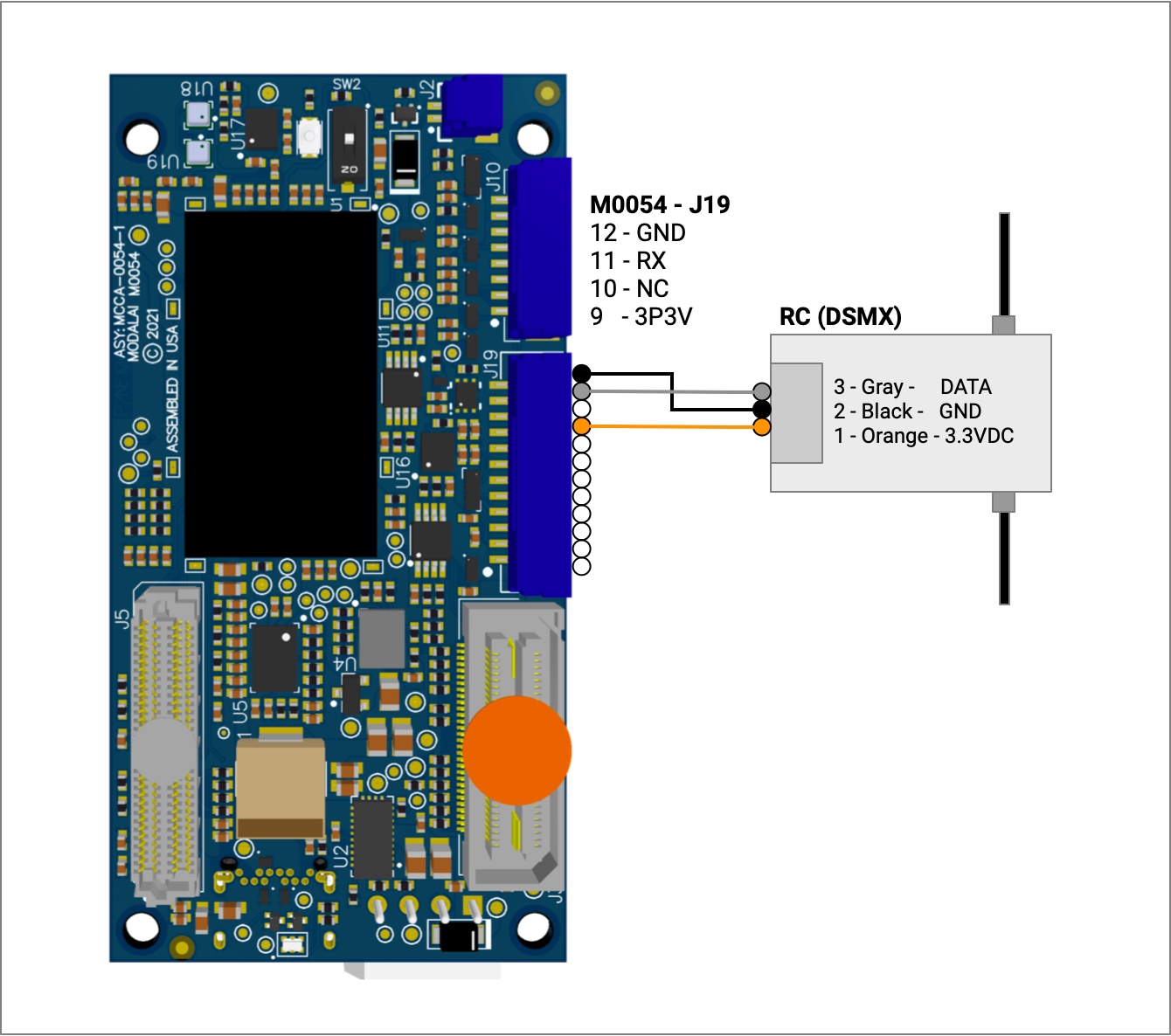
M0054 J19:
- Connector on board : SM12B-GHS-TB(LF)(SN)
- Mating connector : GHR-12V-S
Software
Checking Status
The px4-listener input_rc command can be used to check status.
CRSF
Hardware
PLEASE NOTE: the baud rates for the receivers likely need to be updated.
The baud rates for the receiver UART are set here when PX4 starts on VOXL 2:
- MAVLink - https://github.com/modalai/px4-firmware/blob/voxl-dev-1.12/boards/modalai/rb5-flight/voxl-px4.config#L172
- CRSF - https://github.com/modalai/px4-firmware/blob/voxl-dev-1.12/boards/modalai/rb5-flight/voxl-px4.config#L175
Tested hardware:
- Happymodel ES900EX (in CRSF mode)
- TBS Crossfire Nano Rx (in MAVLink mode)
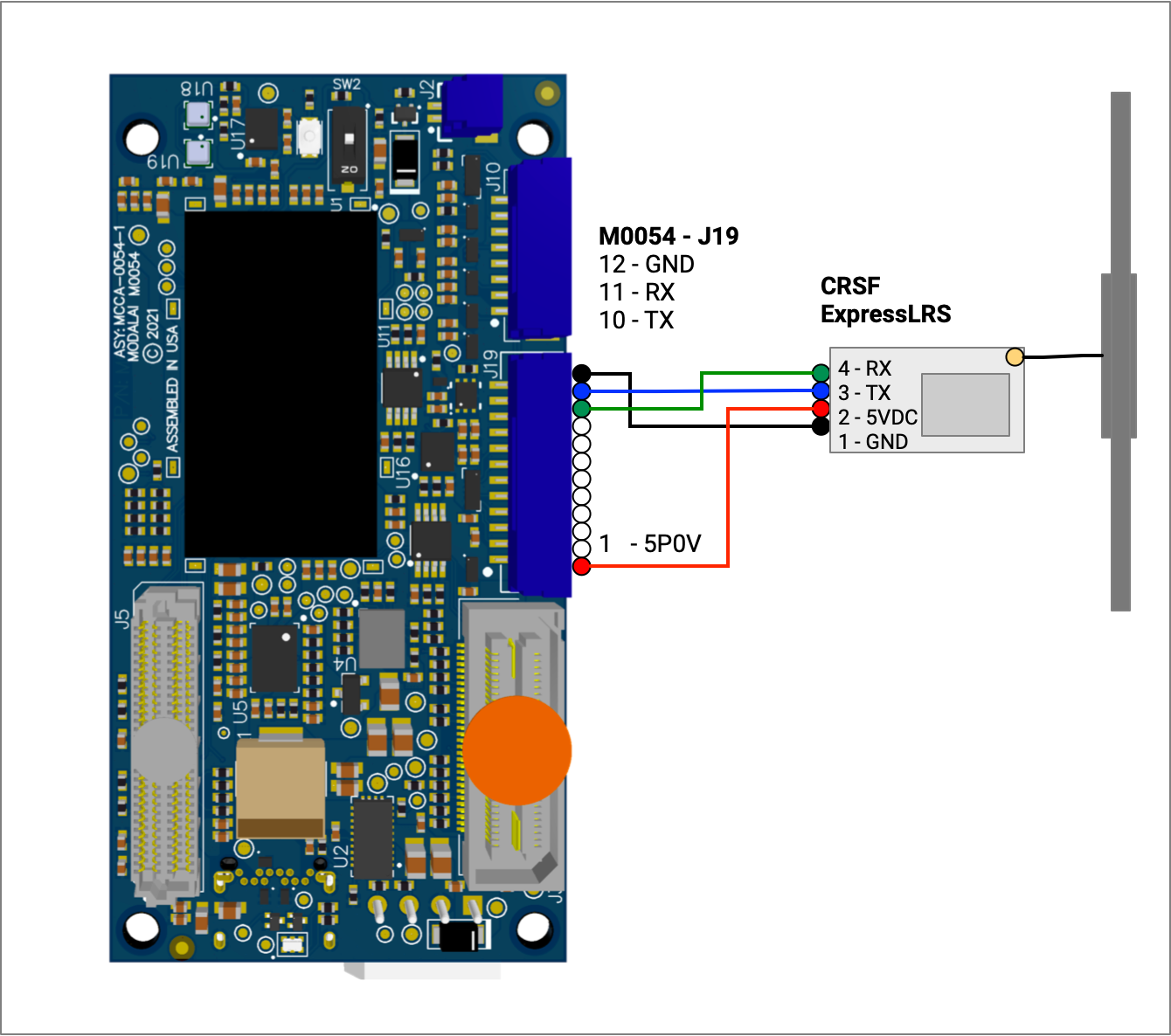
M0054 J19:
- Connector on board : SM12B-GHS-TB(LF)(SN)
- Mating connector : GHR-12V-S
Software
PLEASE NOTE: If using voxl-px4, edit “/etc/modalai/voxl-px4.conf” setting “RC=CRSF_RAW”
Checking Status
The px4-listener input_rc or px4-listener rc_channels command can be used to trouble shoot, if neither have been published it’s likely the receiver has yet to get RC data or the serial link isn’t working.
Ghost Atto RC
GHST Protocol
Connect the RC Receiver to J19
- TX on the GHOST receiver to RC_UART_RX on J19
- 5V on the GHOST receiver to VDC_5V_LOCAL on J19
- GND on the GHOST receiver to GND on J19
PLEASE NOTE: If using voxl-px4, edit “/etc/modalai/voxl-px4.conf” setting “RC=GHST”
Ghost Atto vs ELRS Wiring on J19
A Ghost Atto and an ELRS receiver (for example the M0184) use the same J19 power and ground pins. The difference is the second data line:
| J19 signal | Ghost Atto (GHST) | ELRS receiver |
|---|---|---|
| VDC_5V_LOCAL | Receiver 5V | Receiver 5V |
| GND | Receiver GND | Receiver GND |
| RC_UART_RX | Receiver TX (the only data wire) | Receiver TX |
| RC_UART_TX | Not connected | Receiver RX. Required for voxl-elrs firmware updates and configuration; basic RC control works without it |
RC= in /etc/modalai/voxl-px4.conf | GHST | CRSF_RAW |
When converting a vehicle wired for a Ghost Atto to ELRS, add the RC_UART_TX wire to the J19 connector (pre-crimped JST GH wires are available) and update RC= in /etc/modalai/voxl-px4.conf.
SBUS Protocol
With the VOXL 2 wired up to the connect the VOXL 2 IO board with the Ghost Atto receiver attached to port J3:
- Power on the system, the Atto should have a solid blue LED indicating paring mode.
- Power on the RC controller with the Ghost TX attached.
- On the Ghost Module TX, click the nozzle in.
- on the main menu, Navigate to
Mode...and click in the nozzle. - Change the following:
TX ModefromAutotoManualProtocolfromGHSTtoSBus
- Move the nozzle to the left.
- Navigate to
Bind...then press in the nozzle. - Navigate to
Bind + Setupand changeRXtoProtoSBus. - Navigate to and Select
Start Bind
At this point the Atto should transition from a solid blue light to a red and yellow light indicating the binding was successful. If you go in to the Radio tab on QGC you should see the values for roll, pitch, and yaw. Change as you move the RC controller’s Thumbsticks.
Which UART Can My Receiver Use?
UART routing rules on VOXL 2:
- J19’s RC UART goes to the DSP. Drivers started with
qshell(spektrum_rc, crsf_rc, ghst_rc, gps) run on the DSP and use DSP-mapped UARTs. Drivers on the applications processor use/dev/ttyHS<x>ports instead — butghst_rcis DSP-only and cannot be moved to an apps UART. - SBUS cannot run on J19 — its signal characteristics need the hardware inverter/buffer on the VOXL 2 IO board (M0065), whose J3 connector provides SBUS input plus 5V for the receiver. Futaba, Graupner (in SBUS mode), and Ghost-in-SBUS-mode receivers all go through M0065.
- Sharing one link for RC and MAVLink requires the receiver on an apps-processor UART (expansion board required) — MAVLink can’t run over a DSP-mapped UART.
Binding Notes
- Always power-cycle the vehicle after a successful bind. “Detected 0 radio channels” right after binding is almost always a missing power-cycle.
- Spektrum: in bind mode the receiver flashes orange rapidly; hold the transmitter’s bind control while powering it on until the receiver goes solid. DSMX vs DSM2 matters — if one fails, try the other. ModalAI’s reference transmitter is the DX6e (SPMR6655).
- ELRS (M0184 and others): press and hold the receiver’s physical button within 30 seconds of power-on to enter bind mode. Confirm your transmitter actually runs ELRS on the receiver’s band (915 MHz for M0184).
- ELRS firmware compatibility: receivers and transmitters are compatible within the same major version (3.x.x ↔ 3.x.x) but not across (3.x ↔ 2.x). Update the handset’s TX module with upstream ELRS firmware — ModalAI doesn’t modify transmitter firmware, and handset models/settings persist through the update. ModalAI’s receiver patches only add
voxl-elrsconveniences (unbind command, PWM config); any standard CRSF/ELRS receiver works with VOXL 2. - Switching receiver types (e.g. Ghost → ELRS): rewiring is only half the job — update
RC=in/etc/modalai/voxl-px4.confto match (GHST→CRSF_RAW).
Troubleshooting
For general service debugging see Debugging Services.
“Detected 0 radio channels. To operate PX4 you need at least 5 channels”:
- Power-cycle if you just bound (see above).
px4-listener input_rc— is anything publishing?journalctl -b -u voxl-px4— is the right RC driver starting, and does it report parse errors? For more detail, add-vto the driver’s start line in/usr/bin/voxl-px4-start(e.g.qshell spektrum_rc start -v).- Check
COM_RC_IN_MODEisn’t disabling RC input. - On SDK 1.8 (PX4 1.18), check that the radio has been calibrated (see the next entry).
- Then it’s physical: reseat/replace the cable, scope the receiver’s TX line to confirm it transmits at all, and finally try another receiver.
input_rc shows channels but PX4 ignores the sticks (SDK 1.8, PX4 1.18): PX4 1.18 accepts RC manual control only when RC_CHAN_CNT is non-zero and at least one of RC_MAP_ROLL, RC_MAP_PITCH, RC_MAP_YAW, or RC_MAP_THROTTLE is set. RC_CHAN_CNT defaults to 0 and is written by the radio calibration. Run the radio calibration in QGroundControl (Vehicle Setup > Radio), load a radio helper from voxl-px4-params that sets it, or set it to your receiver’s channel count (1 to 18) by hand:
px4-param set RC_CHAN_CNT 16
PX4 1.14 (SDK 1.6 and older) did not check RC_CHAN_CNT.
Verification chain when RC “sort of” works: px4-listener input_rc shows channels → QGC radio calibration shows stick movement → px4-listener manual_control_setpoint shows correct mapping. When all three pass, the RC link is healthy — motor problems beyond that point are ESC configuration, not RC.
Spektrum “receiver error” spam in the log: older voxl-px4 builds rejected DSM frames whose protocol byte wasn’t 0x01/0x02, which some receiver/transmitter combinations produce. This check was removed — update to a current SDK rather than patching. If errors persist on a current build, try a different transmitter model (DSM protocol flavors vary).
RC dropouts, especially under throttle: usually electrical, not radio — twist the receiver’s UART wires, shorten the cable, route it away from power electronics, and check for connectors loosened by vibration. Dropouts that correlate with motor speed point at noise coupling or a marginal connector.
Historical note: early system images only supported CRSF at 250000 baud (TBS Crossfire), requiring ELRS receivers to be forced down from their standard 420 kbaud. Current SDKs support standard ELRS rates — no baud workaround needed.