
Debugging Services
How to check, restart, and debug VOXL's MPA services
Table of contents
- Overview
- Check What’s Running
- Read the Logs
- Start, Stop, Enable, Disable
- Run a Service in the Foreground
- Check the Pipes
- Common Issues
- Service Reference
- Getting Help
Overview
Every MPA service (voxl-camera-server, voxl-vision-hub, voxl-px4, …) is a standard Linux systemd service. Which services are enabled on your vehicle is decided by its SKU configuration — voxl-configure-mpa enables the right set at configuration time. When something isn’t working, the debugging loop is always the same: check what’s running, read its log, then run it in the foreground for more detail.
Check What’s Running
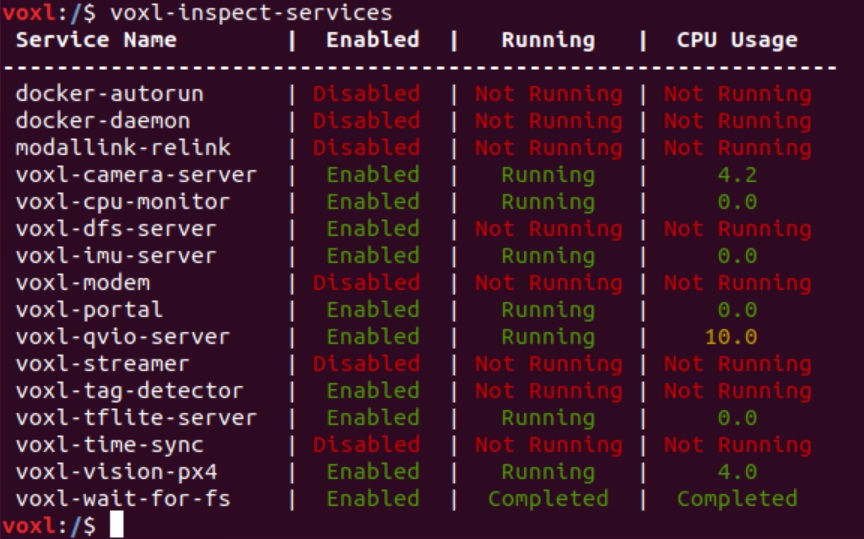
voxl-inspect-services lists every ModalAI-related service with its enabled state, running state, and CPU usage:
voxl-inspect-services
voxl-inspect-services -v   # also show each package version (slower)
voxl-inspect-services -j   # machine-readable JSON
For a single service, standard systemd tools work as expected:
systemctl status voxl-camera-server
Read the Logs
Each service’s stdout/stderr goes to the systemd journal:
journalctl -u voxl-camera-server           # full log
journalctl -u voxl-camera-server -f        # follow live
journalctl -u voxl-camera-server -b        # this boot only
journalctl -u voxl-camera-server -n 100    # last 100 lines
Startup errors — bad config files, missing pipes, missing hardware — almost always show up in the first screen of a service’s journal after start.
Start, Stop, Enable, Disable
systemctl stop voxl-camera-server      # stop now
systemctl start voxl-camera-server     # start now
systemctl restart voxl-camera-server   # e.g. after editing its config file
systemctl disable voxl-camera-server   # don't start on boot
systemctl enable voxl-camera-server    # start on boot
Most services also install a voxl-configure-<name> helper that can enable/disable them and regenerate their config file. To reset the whole vehicle to its SKU’s factory service set, run voxl-configure-mpa (note this resets service configuration).
Run a Service in the Foreground
The most powerful debugging step: stop the background service, then run the same binary by hand in a shell. You get its full stdout in front of you, and nearly every service has extra debug flags — check with -h:
systemctl stop voxl-camera-server
voxl-camera-server -h
Some binaries (voxl-vision-hub, for example) automatically stop their background service when run manually, but stopping it first is a good habit. Remember to systemctl start the service again — or just reboot — when done.
Check the Pipes
MPA services talk through pipes in /run/mpa/. If a downstream service complains about a missing input, check whether the upstream pipe actually exists:
ls /run/mpa/                 # every pipe currently being served
voxl-list-pipes              # same, as a tool
voxl-inspect-cam tracking    # inspect a specific pipe with its matching tool
The inspect tools family covers most pipe types, and voxl-portal gives you a browser view of cameras and many data streams.
Common Issues
- Service isn’t running because it isn’t enabled. Not every SKU enables every service — check
voxl-inspect-servicesand your SKU’s defaults (voxl-configure-mpa) before assuming a crash. - Invalid config file. Service config lives in
/etc/modalai/*.confas JSON — a stray comma stops the service from starting, and the journal will show the parse error. Most services regenerate a clean default config via theirvoxl-configure-<name>helper or a-cflag on the binary. - An upstream service is down. Pipes missing from
/run/mpa/mean the publisher isn’t running — e.g. no VIO output usually traces back to voxl-camera-server or the IMU server, not the VIO service itself. Walk upstream. - Services start before the filesystem is ready. ModalAI services deliberately order themselves after
voxl-wait-for-fs.service; if you write your own service that reads/data, add the same dependency.
Service Reference
Which config file and configure helper belongs to which service (all config files live in /etc/modalai/):
| Service | Config file | Configure helper | Docs |
|---|---|---|---|
| voxl-camera-server | voxl-camera-server.conf | voxl-configure-cameras | docs |
| voxl-imu-server | voxl-imu-server.conf | voxl-configure-imu | docs |
| voxl-open-vins-server | voxl-open-vins-server.conf | voxl-configure-open-vins | docs |
| voxl-qvio-server (legacy platforms) | voxl-qvio-server.conf | voxl-configure-qvio | — |
| voxl-vision-hub | voxl-vision-hub.conf, vfc.conf | voxl-configure-vision-hub | docs |
| voxl-mavlink-server | voxl-mavlink-server.conf | voxl-configure-mavlink-server | docs |
| voxl-px4 | voxl-px4.conf | voxl-configure-px4 | docs |
| voxl-portal | — | voxl-configure-portal | docs |
| voxl-streamer | voxl-streamer.conf | voxl-configure-streamer | docs |
| voxl-mavcam-manager | voxl-mavcam-manager.conf | voxl-configure-mavcam | docs |
| voxl-cpu-monitor | voxl-cpu-monitor.conf | voxl-configure-cpu-monitor | — |
| voxl-tflite-server | voxl-tflite-server.conf | voxl-configure-tflite-wizard | docs |
| voxl-tag-detector | voxl-tag-detector.conf | voxl-configure-tag-detector | docs |
| voxl-lepton-server | voxl-lepton-server.conf | voxl-configure-lepton | docs |
| voxl-mapper | voxl-mapper.conf | — | docs |
Camera and IMU extrinsics (the vehicle’s sensor geometry, used by VIO and the state services) live in the shared /etc/modalai/extrinsics.conf.
Getting Help
When posting on the ModalAI Forum, include the output of voxl-version, voxl-inspect-services -v, and the failing service’s journalctl output — those three answer most first-round questions.