
How to Connect to QGC over 4G/5G
Prerequisites
Before attempting to connect over 4G/5G, make sure you understand how to connect to QGC over WiFi and how Mavlink Routing on VOXL works.
Then follow the steps to connect to the 5G network and confirm the drone has an internet connection over the modem.
VPN Setup
A typical use case of a cellular connection is to connect a drone to a Ground Control Station (GCS) such as QGroundControl. Typically the GCS is also connected to a cellular network. In this case, both the drone and the GCS have been assigned IP addresses that are private to the carrier network. This prevents the drone from directly connecting to the GCS since their IP addresses are not visible to each other over the internet.
There are a variety of ways to solve this issue. ModalAI uses a VPN as the preferred solution.
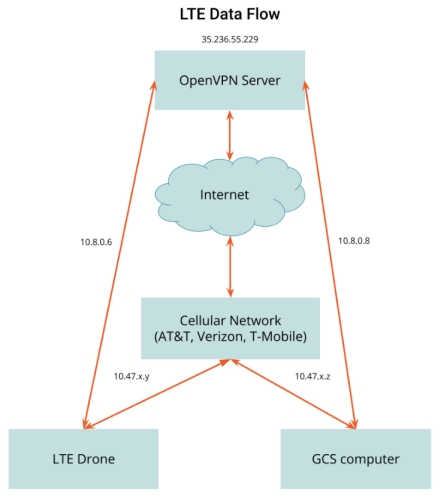
This diagram shows how the VPN solution works. In this example a server is allocated with a static IP address, 35.236.55.229. Once the drone has connected to the AT&T network, it obtains the IP address 10.47.x.y and the GCS, once connected, obtains the address 10.47.x.z. With the VPN server software running on the cloud server and VPN client software on both the drone and the GCS, the devices can now connect and get VPN IP address assignments. In this diagram, the drone is assigned 10.8.0.6 and the GCS is assigned 10.8.0.8. The drone can now communicate directly to the GCS using the 10.8.0.8 IP address.
It is desirable for the drone and the GCS to always get the same IP address when connecting to the VPN. This is possible by assigning each separate network endpoint a unique security certificate. When each endpoint connects using its certificate it can be configured to receive the same address every time.
We prefer to use Tailscale as our VPN provider. Tailscale is simple, fast, and straightforward to set up, and its free tier is a solid choice for robotics use cases. If you prefer to host your own server, you can do so with Google Cloud Platform, Amazon Web Services, Microsoft Azure, etc. Ubuntu is our preferred OS for our servers. Our self-hosted VPN server is set up using the OpenVPN software package.
Tailscale VPN Setup
To install the Tailscale client on VOXL 2, follow the instructions for your device’s Ubuntu release at Tailscale: Install on Linux. Once the client is installed and authenticated, the drone appears in your Tailscale network with a stable VPN address.
Install the Tailscale client on the GCS computer as well and confirm both devices are in the same Tailscale network.
Confirm Connection
In QGroundControl, add a UDP comm link targeting the drone’s VPN address on port 14550. If the connection succeeds, you should get a connected status in QGC.