
VOXL Open-VINS Server
voxl-open-vins-server is a multi-camera visual-inertial odometry (VIO) service for the VOXL 2 platform. It uses an MSCKF-based estimator derived from OpenVINS to fuse data from up to 3 cameras and an IMU, producing real-time pose and velocity estimates that are forwarded to the autopilot as odometry data. Cameras may be hardware-synchronized or fully unsynchronized, global-shutter or rolling-shutter (including mixed rigs such as a rolling-shutter hires camera paired with a global-shutter tracking camera) — see Asynchronous & Mixed-Shutter Cameras. Initialization and recovery run a deterministic on-board SfM pipeline — see Initialization & Resets.
The server is built around three modular subsystems: VoxlCore (configuration, housekeeping, publishing), VoxlCam (camera management and feature tracking via OpenCL), and VoxlIMU (IMU data acquisition and frame transformation). Data flows through ModalAI’s MPA pipe architecture, which decouples sensor producers from VIO consumers and downstream clients.
Table of contents
- Architecture
- Prerequisites
- Installation and Setup
- Configuration Files
- MPA Pipes
- Command-Line Options
- Client Tools
- Testing
- Troubleshooting
- Legacy Parameter Notes
- API Reference
Architecture
System Overview
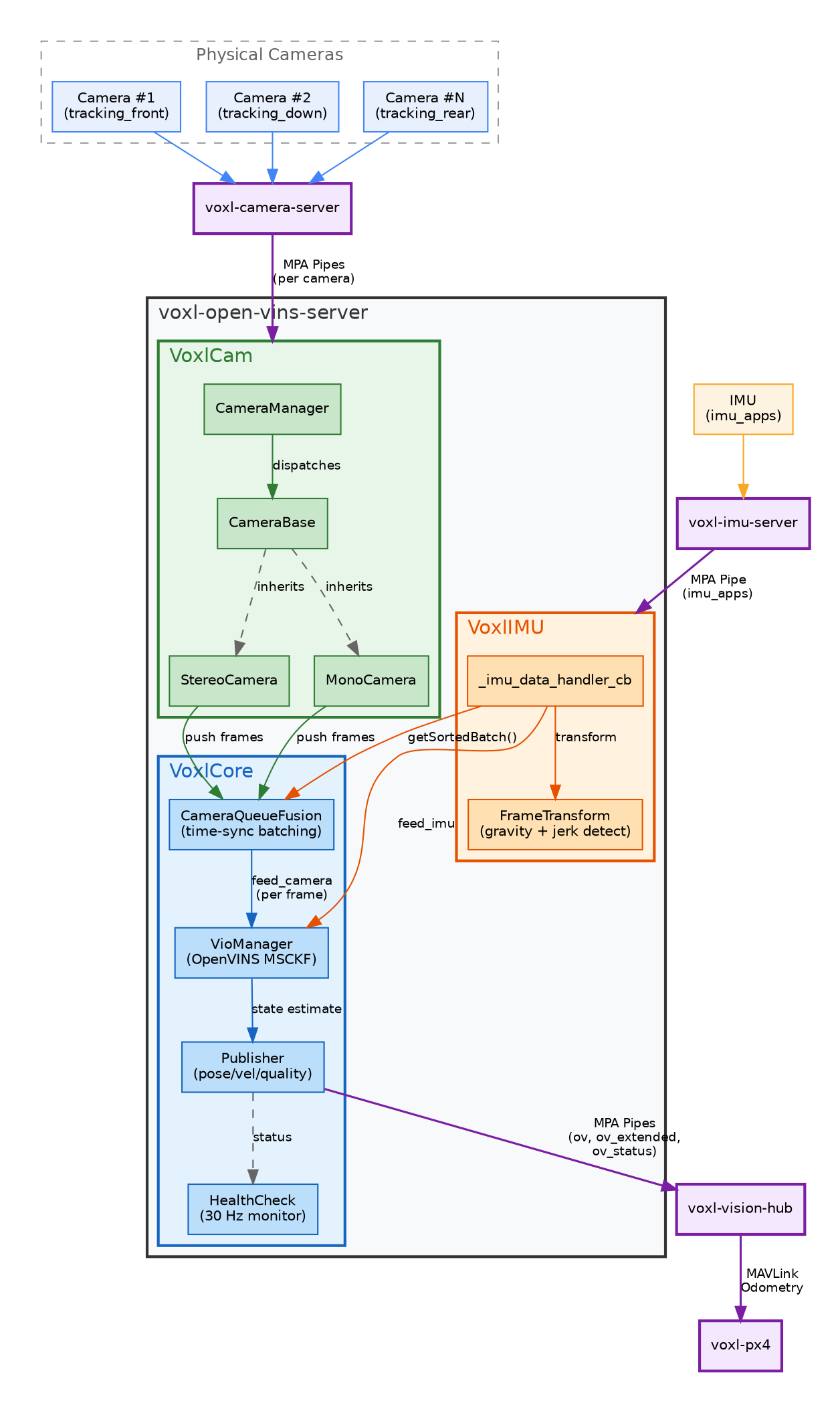
The server follows an IMU-driven pattern: camera frames are staged lock-free as they arrive, and each IMU batch advances the filter and releases whatever frames are ready.
- IMU data arrives via MPA pipe and is handled by
VoxlIMUon an RT-priority thread. TheFrameTransformmodule detects gravity direction and jerk events for initialization gating. - Camera frames arrive through per-camera MPA pipes.
CameraManagerdispatches frames to oneMonoCamerainstance per camera (stereo pairs are matched in the estimator whenuse_stereois set), which push them directly into the estimator’s lock-free per-camera ingest — there is no fusion thread and no frame pairing; camera callbacks never block. - Each IMU callback feeds the batch to the OpenVINS VioManager, which releases staged camera frames in global timestamp order (each frame only once inertial data covers it) and runs tracking plus the MSCKF update per released frame. Synchronized rigs produce same-timestamp frames that are bundled automatically; with
epoch_mode: true(thefpvhiresandzmonoprofiles), unsynchronized rigs flow through epoch-anchored cloning. - Publisher formats the resulting state (pose, velocity, quality, error codes) with coordinate frame transformation (OpenVINS → FRD) and writes to output pipes — on the same VIO thread, immediately after each update.
- HealthCheck runs at 30 Hz, monitoring connectivity, triaging error codes by severity, and driving auto-reset.
Data Flow
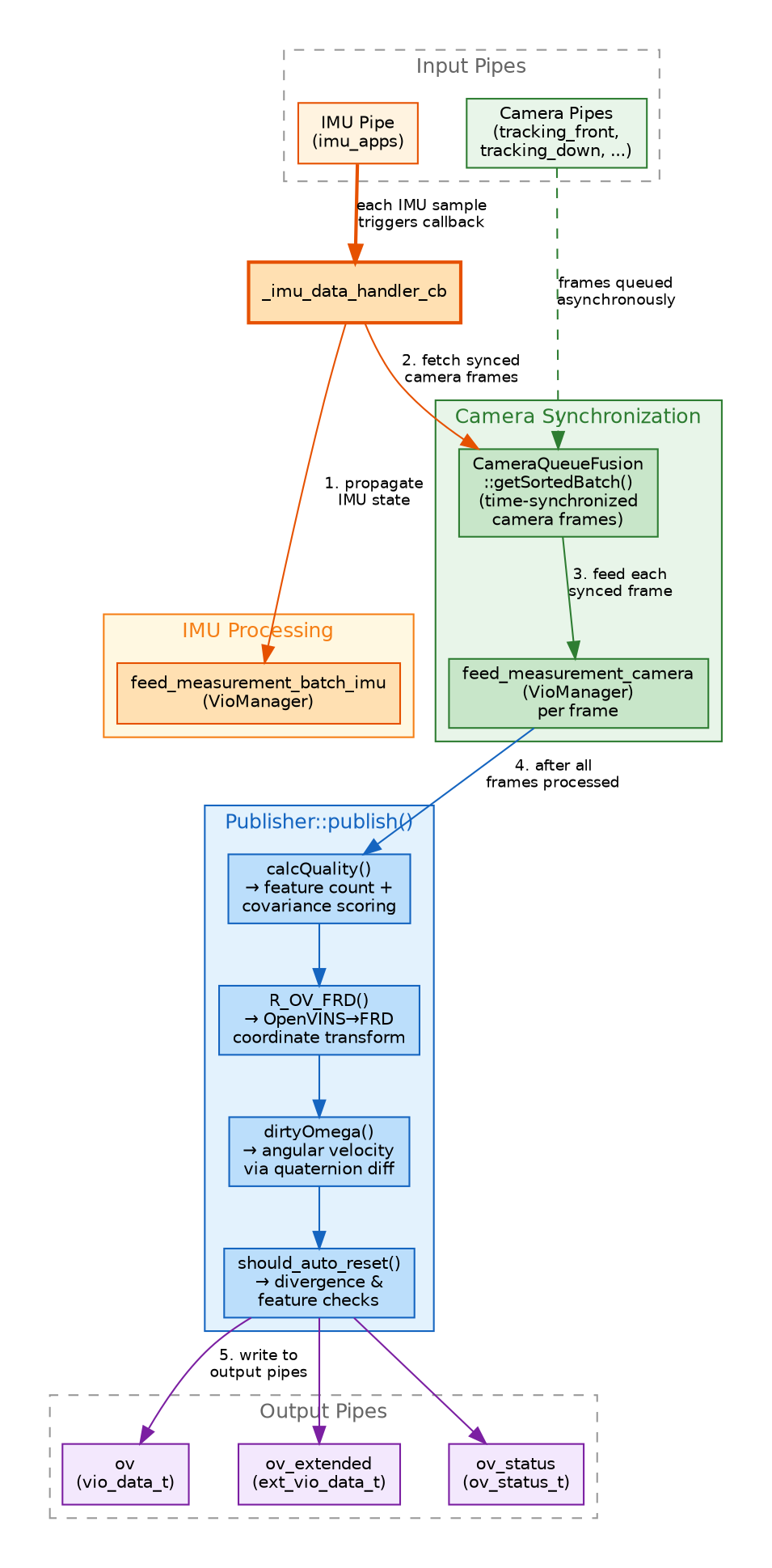
Per-sample data flow: camera callbacks stage frames into lock-free per-camera rings; each _imu_data_handler_cb invocation feeds the IMU batch to the VioManager, which releases staged frames in global timestamp order, runs the MSCKF update, and publishes through Publisher::publish() on the same thread. Dropped frames (late, ring-full, bogus timestamp) are returned to their owner exactly once and are counted, never fatal.
Module Dependencies
| Module | Key Classes | Responsibility |
|---|---|---|
| VoxlCore | Publisher, HealthCheck, VoxlConfigure | Main loop, configuration, publishing, quality metric, health monitoring |
| VoxlCam | CameraManager, CameraBase, MonoCamera | Camera pipe subscription, image preprocessing, direct push into the estimator ingest |
| VoxlIMU | FrameTransform, _imu_data_handler_cb | IMU pipe subscription, frame transformation, jerk detection |
| ov_msckf (library) | VioManager, AsyncCameraBuffer, State, updaters | Lock-free ingest, epoch-anchored MSCKF estimation, per-camera temporal/rolling-shutter states |
| ov_init (library) | DynamicInitializer, zbft_sfm solver | Ceres-free SfM initialization, any-attitude init/reset, warm start |
Camera Class Hierarchy
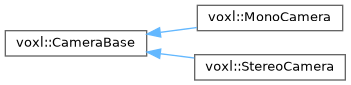
CameraBase is the abstract base class. MonoCamera handles each camera pipe; the older concatenated-frame StereoCamera was removed, and stereo pairs are matched in the estimator. Cameras push frames directly into the estimator’s lock-free per-camera ingest from the pipe callback — no intermediate fusion queue.
Initialization Flow
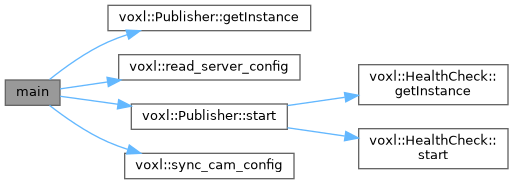
main() call graph: reads config, syncs camera calibration, starts Publisher (which starts HealthCheck), then enters the event loop.
Prerequisites
- VOXL 2 or QCS6490-based hardware
- VOXL SDK 1.4.0 or later. This page describes
voxl-open-vins-server0.7.8 as shipped in SDK 1.8.0; features marked SDK 1.8.0+ (presets, in-flight calibration, the calibration tools) are not in the 0.6.x server that ships with SDK 1.6 - All tracking cameras calibrated (intrinsics files present in
/data/modalai/) - Extrinsics configured in
/etc/modalai/extrinsics.conf(see Configure Extrinsics) - Camera feeds verified in voxl-portal before enabling VIO
Installation and Setup
Install
If you are working on a non-development drone, back up configuration and intrinsic files first:
/etc/modalai
/data/modalai
Disable qvio
Only one VIO source should be active at a time. Disable qvio before starting voxl-open-vins-server:
voxl-configure-qvio disable
Generate Configuration
Run the configuration tool to write /etc/modalai/voxl-open-vins-server.conf:
voxl-configure-open-vins <camera_configuration>
Available configurations:
| Argument | Rig | Cameras |
|---|---|---|
starling2_2cam | Starling 2 | front + down tracking (forced camera sync) |
fpv | VOXL 2 FPV | duo AR0144 tracking, hardware-synchronized |
fpvhires | VOXL 2 FPV, hires VIO | IMX664 hires (rolling shutter, 60 fps) + AR0144 tracking (global shutter, 30 fps), unsynchronized — see Async & Mixed-Shutter Cameras |
factory_enable | generic | default config for synced AR0144 cameras |
fpvm | VOXL 2 FPV on M0197 (QCS6490, BMI270 IMU) | duo AR0144 tracking, hardware-synchronized (SDK 1.8.0+) |
fpvhiresm | single hires camera | IMX664 hires only (rolling shutter), mono (SDK 1.8.0+) |
starling2m | Starling 2, single camera | one tracking camera, mono, unsynchronized ingest (SDK 1.8.0+) |
starling2bmi | Starling 2 with BMI270 IMU | two tracking cameras, unsynchronized ingest (SDK 1.8.0+) |
zmono | single hires camera | IMX664 hires (rolling shutter, 60 fps), mono: the fpvhires rig without the tracking camera (SDK 1.8.0+) |
For example, voxl-configure-open-vins starling2_2cam configures a two-camera setup using front and down tracking cameras. The result should be in agreement with the three configuration files in /etc/modalai/:
voxl-open-vins-server.confvio_cams.confextrinsics.conf(if not already present)
On SDK 1.8.0 and later, check that the server conf and the profile YAMLs it points at are consistent before starting the service. voxl-vins-autoconf validates the set and reports problems (dry run); --apply fixes what it reports:
voxl-vins-autoconf
voxl-vins-autoconf --apply
Start the Service
systemctl restart voxl-open-vins-server
Configuration Files
Three files in /etc/modalai/ control the server:
extrinsics.conf
Defines the geometric relationship between sensors (cameras, IMU) and the body frame. See the extrinsics configuration page for details.
When imu_body_frame_mode is enabled (default), the server also reads the body -> imu_apps extrinsic to transform VIO output into the body frame.
vio_cams.conf
Defines which camera pipes to subscribe to and how each camera participates in VIO. Example for a two-camera setup:
{
    "cams": [{
            "enable":               true,
            "name":                 "tracking_front",
            "pipe_for_preview":     "tracking_front",
            "pipe_for_tracking":    "tracking_front",
            "is_occluded_on_ground": false,
            "imu":                  "imu_apps",
            "cal_file":             "opencv_tracking_front_intrinsics.yml"
        },{
            "enable":               true,
            "name":                 "tracking_down",
            "pipe_for_preview":     "tracking_down",
            "pipe_for_tracking":    "tracking_down",
            "is_occluded_on_ground": true,
            "imu":                  "imu_apps",
            "cal_file":             "opencv_tracking_down_intrinsics.yml"
        },{
            "enable":               false,
            "name":                 "tracking_rear",
            "pipe_for_preview":     "tracking_rear",
            "pipe_for_tracking":    "tracking_rear",
            "is_occluded_on_ground": false,
            "imu":                  "imu_apps",
            "cal_file":             "opencv_tracking_rear_intrinsics.yml"
        }]
}
| Field | Description |
|---|---|
enable | Whether this camera is active in the VIO pipeline |
name | Camera identifier used in logs and overlays |
pipe_for_tracking | MPA pipe name to subscribe to for feature tracking frames. Can differ from the preview pipe (e.g. tracking_front_misp_norm or tracking_front_misp_grey) depending on which image processing yields the best features for your application |
pipe_for_preview | MPA pipe name used for overlay visualization |
is_occluded_on_ground | If true, this camera’s view is obstructed while landed (e.g. a downward camera on the ground). The server will not use features from this camera until the drone reaches takeoff_alt_threshold altitude |
imu | IMU pipe name. All cameras must reference the same IMU |
cal_file | OpenCV intrinsics calibration file in /data/modalai/ |
To enable a third camera, set its enable field to true.
voxl-open-vins-server.conf
Main server configuration file. The server creates this file with default values if it does not exist. All parameters are read by read_server_config() in VoxlConfigure.cpp.
Auto-Reset Parameters
| Parameter | Type | Default | Description |
|---|---|---|---|
en_auto_reset | bool | true | Enable automatic VIO reset when divergence or low feature count is detected |
auto_reset_max_velocity | float | 20.0 | Velocity magnitude threshold (m/s) above which the system considers the estimate divergent |
auto_reset_max_v_cov_timeout_s | float | 0.5 | Duration (s) that quality must remain below threshold before an auto-reset is recommended |
auto_reset_min_features | int | 1 | Minimum number of tracked features required to avoid a reset |
auto_reset_min_feature_timeout_s | float | 10.0 | Duration (s) that the feature count must stay below the minimum before triggering a reset |
State Machine and Spin Monitoring
| Parameter | Type | Default | Description |
|---|---|---|---|
ok_state_grace_timeout_s | float | 2.0 | Grace period (s) after entering OK state during which quality is held low to avoid false confidence from bad initialization |
fast_yaw_thresh | float | 5.0 | Yaw rate (rad/s) above which spinning-in-place detection engages |
fast_yaw_timeout_s | float | 1.75 | Duration (s) of sustained spinning-in-place before an auto-reset is recommended |
OpenVINS and Camera Mode
| Parameter | Type | Default | Description |
|---|---|---|---|
yaml_folder | string | /usr/share/modalai/voxl-open-vins/VoxlConfig/starling2 | Path to the folder containing OpenVINS YAML configuration files (estimator_config.yaml, kalibr_imucam_chain.yaml) |
using_stereo | int | 0 | When sync_config is true, overrides use_stereo in the estimator YAML (1 on, 0 off). Ignored when sync_config is false |
stereo_z_min | float | 0.30 | Minimum depth (m) accepted by the stereo matcher (SDK 1.8.0+) |
stereo_z_max | float | 100.0 | Maximum depth (m) accepted by the stereo matcher (SDK 1.8.0+) |
stereo_calibration | string | "" | Optional path to a voxl_stereo_calibration.yml from an offline stereo calibration. Blank leaves the stereo matcher on the left-to-right extrinsic composed from the camera chain (SDK 1.8.0+) |
sync_config | bool | true | Calibration synchronization at startup — this flag does not affect frame ingest or timing. true: the server regenerates the OpenVINS YAMLs from system calibration — camera intrinsics/distortion are refreshed from /data/modalai, the cam-to-cam extrinsic is composed from the per-camera cam → imu extrinsics, and the estimator/camchain YAMLs are rewritten. false: the calibration files shipped in yaml_folder are authoritative and are not regenerated (e.g. starling2_2cam); an active calibration hot start still writes the camera chain |
Takeoff and Occlusion
| Parameter | Type | Default | Description |
|---|---|---|---|
takeoff_alt_threshold | float | 0.5 | Altitude (m) above which cameras marked is_occluded_on_ground become active |
In-Flight Calibration (SDK 1.8.0+)
These keys connect VIO to the targetless calibrator (see Command-Line Options and VINS Calibration). All default to false. voxl-vins-autoconf --enable-zcal sets en_calib_hotstart; --disable-zcal clears en_calib_hotstart, calibrate_first, and calib_hotstart_on_reset. Neither changes calib_restore_governor.
| Parameter | Type | Default | Description |
|---|---|---|---|
en_calib_hotstart | bool | false | At boot, apply the values of the committed blocks in the calibration snapshot (/data/ov_calib/ov_calib_result.yaml) to the estimator configuration. Filter noise and prior sigmas are not changed. --no-calib-hotstart forces it off for one run |
calibrate_first | bool | false | A boot with no committed snapshot runs a calibration session first, then starts VIO in the same process with the new values. Delete the snapshot to recalibrate. Retries are bounded. Requires en_calib_hotstart: true; otherwise it is ignored |
calib_restore_governor | bool | false | Restore the automatic CPU governor after a calibration session. A board already in performance mode is never changed |
calib_hotstart_on_reset | bool | false | A hard reset normally reverts to the on-disk configuration from before calibration. true re-applies the snapshot on the rebuilt filter |
Frame Settings
| Parameter | Type | Default | Description |
|---|---|---|---|
imu_body_frame_mode | bool | true | When enabled, the server reads the body -> imu extrinsic and outputs VIO in the body frame. The IMU pipe is subscribed as imu_apps_body instead of imu_apps |
imu_init_max_gravity_angle_deg | float | -1.0 | Level-start gate for IMU initialization, in degrees: if set >= 0, IMU data is held back from the estimator until the measured gravity angle is within this many degrees of level. The default -1.0 disables the gate so (re)initialization can happen at any attitude |
Quality Hysteresis
The server uses a state machine with hysteresis to classify VIO quality: INITIAL, GOOD, and BAD. The thresholds and transition counts below control state transitions.
| Parameter | Type | Default | Description |
|---|---|---|---|
quality_low_thresh_initial | int | 15 | Quality score threshold below which degradation is detected in INITIAL state |
quality_low_thresh_good | int | 14 | Quality score threshold below which degradation is detected in GOOD state |
quality_high_thresh | int | 35 | Quality score threshold above which recovery is detected (used for INITIAL->GOOD and BAD->GOOD transitions) |
quality_initial_to_bad_count | int | 20 | Consecutive low-quality samples required to transition from INITIAL to BAD |
quality_initial_to_good_count | int | 50 | Consecutive high-quality samples required to transition from INITIAL to GOOD |
quality_bad_to_good_count | int | 60 | Consecutive high-quality samples required to transition from BAD to GOOD |
quality_good_to_bad_count | int | 45 | Consecutive low-quality samples required to transition from GOOD to BAD |
MPA Pipes
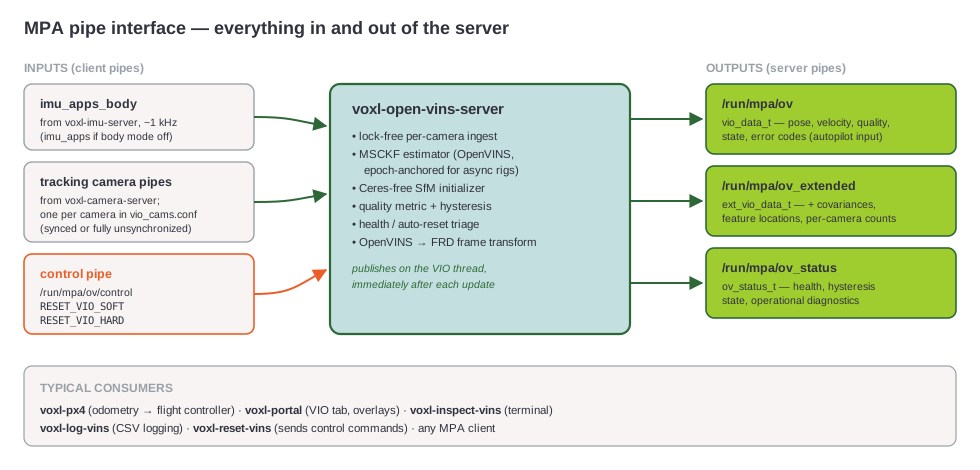
The tables below summarize the interface; the complete communications reference — packet fields, states, quality semantics, and the full error-code table with severities — is on the dedicated Pipe Interface page.
Output Pipes
| Pipe | Type | Description |
|---|---|---|
ov_extended | ext_vio_data_t | Full VIO state including covariance matrices, feature counts, quality, and error codes |
ov | vio_data_t | Simplified VIO data with pose and velocity for basic consumers |
ov_status | ov_status_t | System status, health information, and operational state |
Publisher Pipeline
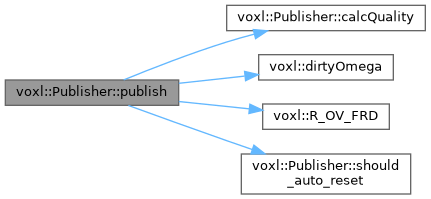
Publisher::publish() call graph: calculates quality score, computes angular velocity via dirty quaternion differentiation, applies OpenVINS→FRD coordinate transform, and checks auto-reset conditions before writing to output pipes.
Input Pipes
| Pipe | Source | Description |
|---|---|---|
imu_apps (or imu_apps_body) | voxl-imu-server | IMU data (accelerometer and gyroscope). The _body variant is used when imu_body_frame_mode is enabled |
| Camera pipes (dynamic) | voxl-camera-server | One pipe per camera defined in vio_cams.conf (e.g. tracking_front, tracking_down) |
Control Pipe
The server exposes a control pipe at /run/mpa/ov/control that accepts the following commands:
| Command | Description |
|---|---|
RESET_VIO_SOFT | Soft reset: reinitializes the VIO state without recreating the VioManager |
RESET_VIO_HARD | Hard reset: destroys and recreates the VioManager from scratch |
Control pipes are available on both the ov_extended and ov server channels.
Command-Line Options
Usage: voxl-open-vins-server [OPTIONS]

Options:
  -d, --debug     Enable debug output and detailed logging
  -v, --verbose   Enable verbose output and status information
  -c, --config    Configuration only mode (load and validate config, then exit)
  -i, --imu-body  Enable IMU body measurements (overrides conf file)
  -k, --calibrate Run the targetless calibrator instead of VIO (SDK 1.8.0+)
  -h, --help      Display help message
Examples:
voxl-open-vins-server              # Run with default settings
voxl-open-vins-server -d           # Run with debug output
voxl-open-vins-server -v -c        # Validate configuration only
In 0.7.8
-ihas no effect: the server readsimu_body_frame_modefrom the conf file after parsing options, so the conf value wins.
In-Flight Calibration Options (SDK 1.8.0+)
-k / --calibrate runs a targetless camera-IMU calibration session instead of VIO. The session uses the same IMU and camera pipes and frame gating as VIO, solves, writes its result, and exits; the exit code is the session verdict (0 = completed and committed). Stop the service first, because this mode takes over the server’s process name and pipes. For the full procedure see VINS Calibration.
systemctl stop voxl-open-vins-server
voxl-open-vins-server --calibrate --calib-flight
| Option | Description |
|---|---|
-k, --calibrate | Run the calibrator instead of VIO |
--calib-cam <name> | Calibrate only this vio_cams.conf camera. By default every configured camera is calibrated in one joint solve, and the first global-shutter camera anchors the report. Name a rolling-shutter camera explicitly to calibrate it alone |
--calib-out <yaml> | Result path. Default /data/ov_calib/ov_calib_result.yaml |
--calib-flight | Apply the flight profile shape: a short session, 60 s class, suitable for an in-flight or quick bench run. The bench profile in ov_calib.yaml is the longer, full-shape solve |
--calib-max-sec <s> | Absolute collection cap, in stream seconds |
--calib-budget <s> | Solver wall-time budget override |
--calib-config <yaml> | Calibrator profile. Default /etc/modalai/ov_calib.yaml (separate from the estimator config) |
--calib-no-perf-mode | Leave the CPU governor alone. By default the session requests the performance governor |
--calib-min-eig <x> | Stop collecting once the weakest calibration direction reaches x. Default 5.0; 0 collects the full budget |
--no-calib-hotstart | Do not apply a committed calibration snapshot for this run, regardless of en_calib_hotstart |
Client Tools
voxl-reset-vins
Sends a reset command to the running server through the control pipe.
voxl-reset-vins          # Send a hard reset
voxl-reset-vins -s       # Send a soft reset
voxl-inspect-vins
Real-time terminal display of VIO data from the ov pipe. Shows position, rotation, velocity, features, quality, state, and error codes.
voxl-inspect-vins              # Default view (position, rotation, features, quality, state, errors)
voxl-inspect-vins -v           # Include velocity
voxl-inspect-vins -b           # Display values in body frame (reads body->imu extrinsic)
voxl-inspect-vins -z           # Print all fields
voxl-inspect-vins -n           # Print each sample on a new line (useful for logging)
| Flag | Description |
|---|---|
-a | Print IMU angular velocity |
-b | Print values in body frame |
-g | Print gravity vector |
-m | Print camera-to-IMU extrinsics |
-n | Print each sample on a new line |
-t | Print timestamp in nanoseconds |
-v | Print velocity |
-z | Print all fields |
voxl-vins-autoconf
SDK 1.8.0+. Inspects and validates voxl-open-vins-server.conf together with the profile YAML folder it points at (estimator config and kalibr chains): YAML syntax the server’s parser would reject, shutter/readout/fps declarations, max_cameras against the chain, the calibration key group, and hot-start snapshot presence. Dry run by default; --apply fixes what it reports, writes atomically, and keeps a one-time .bak. Exit code 0 = consistent, 1 = findings, 2 = hard error.
voxl-vins-autoconf                          # inspect + validate (no writes)
voxl-vins-autoconf --apply                  # fix what it reports
voxl-vins-autoconf --profile fpvhiresM      # point yaml_folder at a shipped profile
voxl-vins-autoconf --enable-zcal            # set en_calib_hotstart
voxl-vins-autoconf --log <log_dir>          # validate a voxl-logger capture's config tree
voxl-vins-lab
SDK 1.8.0+. Offline replay harness: feeds a voxl-logger capture directly into an in-process estimator through the same sensor conversion code as the live server, and writes per-frame CSV and a summary. It runs on the VOXL (the tracker needs the device’s OpenCL) and does not modify /etc/modalai or /data/modalai. It replaces voxl-log-vins and voxl-evaluate-vins, which were removed in SDK 1.8.0.
voxl-vins-lab -l /data/voxl-logger-auto/log0005 -o /data/vinslab/base
voxl-vins-lab -l <log_dir> --speed 1 --publish      # real-time replay, publish ov/ov_extended
voxl-vins-lab -l <log_dir> --calib /data/ov_calib/ov_calib_result.yaml   # replay under a calibration
--interactive adds play/pause/step/seek with filter snapshots, --tracker-only runs only the tracking front-end and writes a session record, and --session <bin> drives the filter alone from a recorded session. Run voxl-vins-lab -h for the full option list.
voxl-zcalib
SDK 1.8.0+. Standalone targetless camera-IMU calibration. Unlike voxl-open-vins-server --calibrate, it runs alongside a running VIO process without taking over its pipes or rewriting its calibration chain, and it can calibrate cameras that are not enabled for VIO (--cam-pipe with --cam-intrinsics). Exit code 0 = committed, 2 = aborted or refused, 1 = usage or I/O error.
voxl-zcalib --list-cams                     # list declared and live cameras
voxl-zcalib --live --cam tracking_front --flight
voxl-calib-to-extrinsics
SDK 1.8.0+. Writes the committed camera extrinsics from a calibration result (default /data/ov_calib/ov_calib_result.yaml) into extrinsics.conf. Only committed blocks are written, and rotation and translation pass plausibility checks first. The default output is <conf>.calibrated; --in-place writes the conf itself after saving <conf>.bak.
voxl-calib-to-extrinsics                    # writes /etc/modalai/extrinsics.conf.calibrated
voxl-calib-to-extrinsics --in-place
voxl-calib-commit-chains
SDK 1.8.0+. Makes a committed calibration permanent: writes it into the active kalibr_imu_chain.yaml and kalibr_imucam_chain.yaml, then turns the hot-start keys off in the server conf. It sets sync_config to false by default so the next boot does not regenerate the chains from extrinsics.conf (--keep-sync-config keeps it). -e also writes the committed extrinsics into extrinsics.conf. --dry-run shows the changes without writing.
voxl-calib-commit-chains --dry-run
voxl-calib-commit-chains -e
voxl-benchmark-vio
Utility for benchmarking VIO performance on VOXL.
voxl-benchmark-vio orchestrates repeatable, automated replay-based benchmarking of voxl-open-vins-server (or voxl-open-sqrtvins2-server) over one or more recorded logs. Given an input definition JSON, for each listed log it stages the appropriate camera/VIO config, spawns the VIO server alongside an analyzer that listens to its outputs, and runs voxl-replay to feed the log data through the pipeline. Per-run metrics (pose, CPU usage, etc.) are written to per-log JSONs and merged into a single summary JSON.
Typical use cases:
- Comparing the impact of a config change (e.g. GPU vs CPU tracking, OpenVINS vs SqrtVINS) across a fixed set of logs.
- Regression-testing VIO accuracy and CPU cost across SDK releases.
- Monte-Carlo runs of the same suite to measure run-to-run variance.
For full details on the input JSON schema, expected log layout, CLI flags, and output format, see the dedicated page:
Testing
Hand Testing
Hand testing verifies that extrinsics are correct and the VIO pipeline is functioning before flight. This is the recommended starting point.
Steps
- SSH or ADB shell into the VOXL 2.
- Make sure
voxl-camera-serveris running (it provides the camera pipes that VIO subscribes to), then start the VIO service:systemctl status voxl-camera-server # confirm it is active/running systemctl restart voxl-open-vins-server Open voxl-portal and navigate to the VIO tab. Optionally toggle Raw Feed: ON to confirm the tracking camera feed(s) currently being consumed by VIO are live.
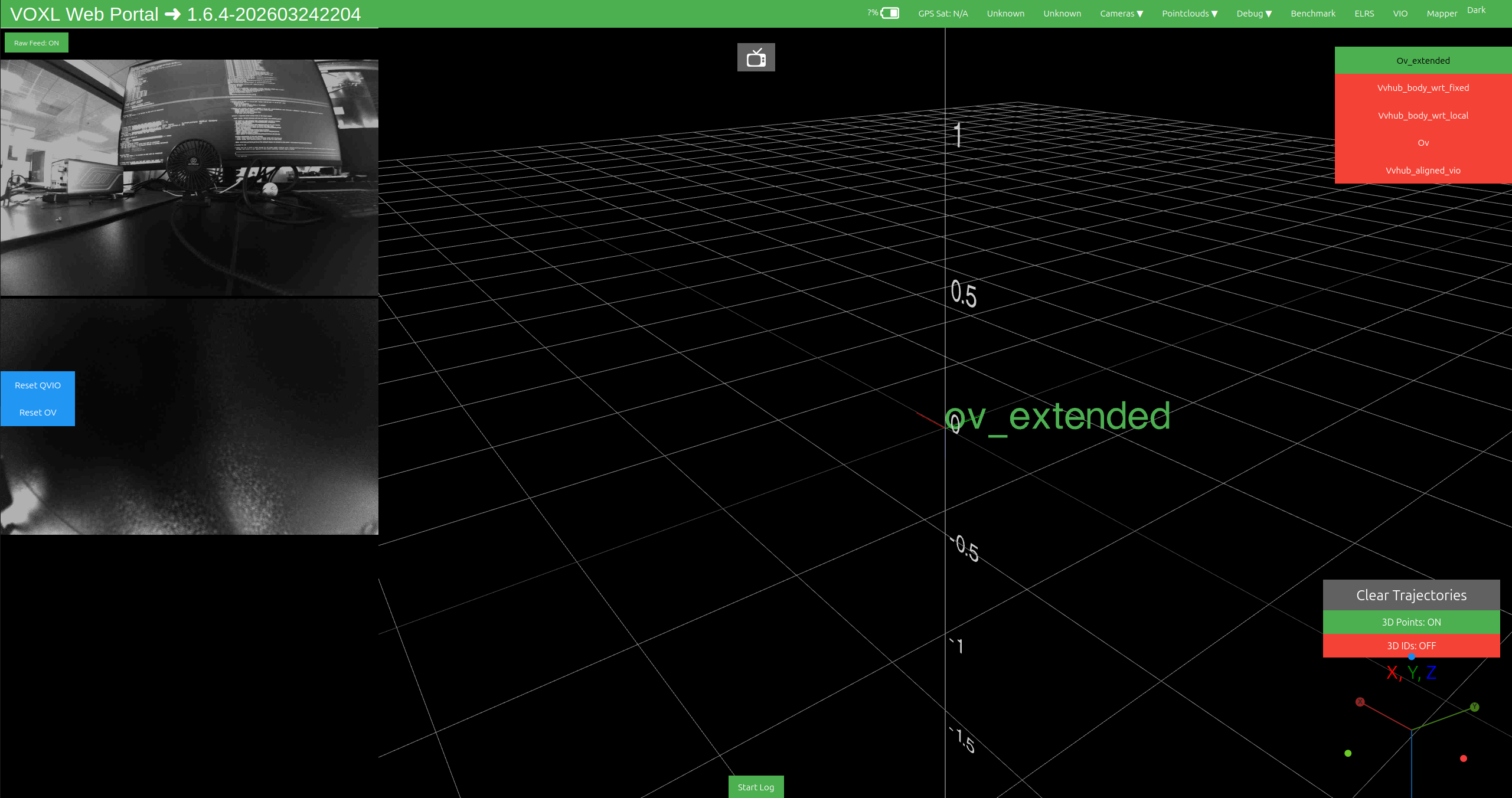
Lift the drone with a small jerk motion (simulating takeoff). Features should start populating on the overlay. Then perform translational motion — move the drone left-right and front-back — and watch the XYZ position values update in the VIO tab.
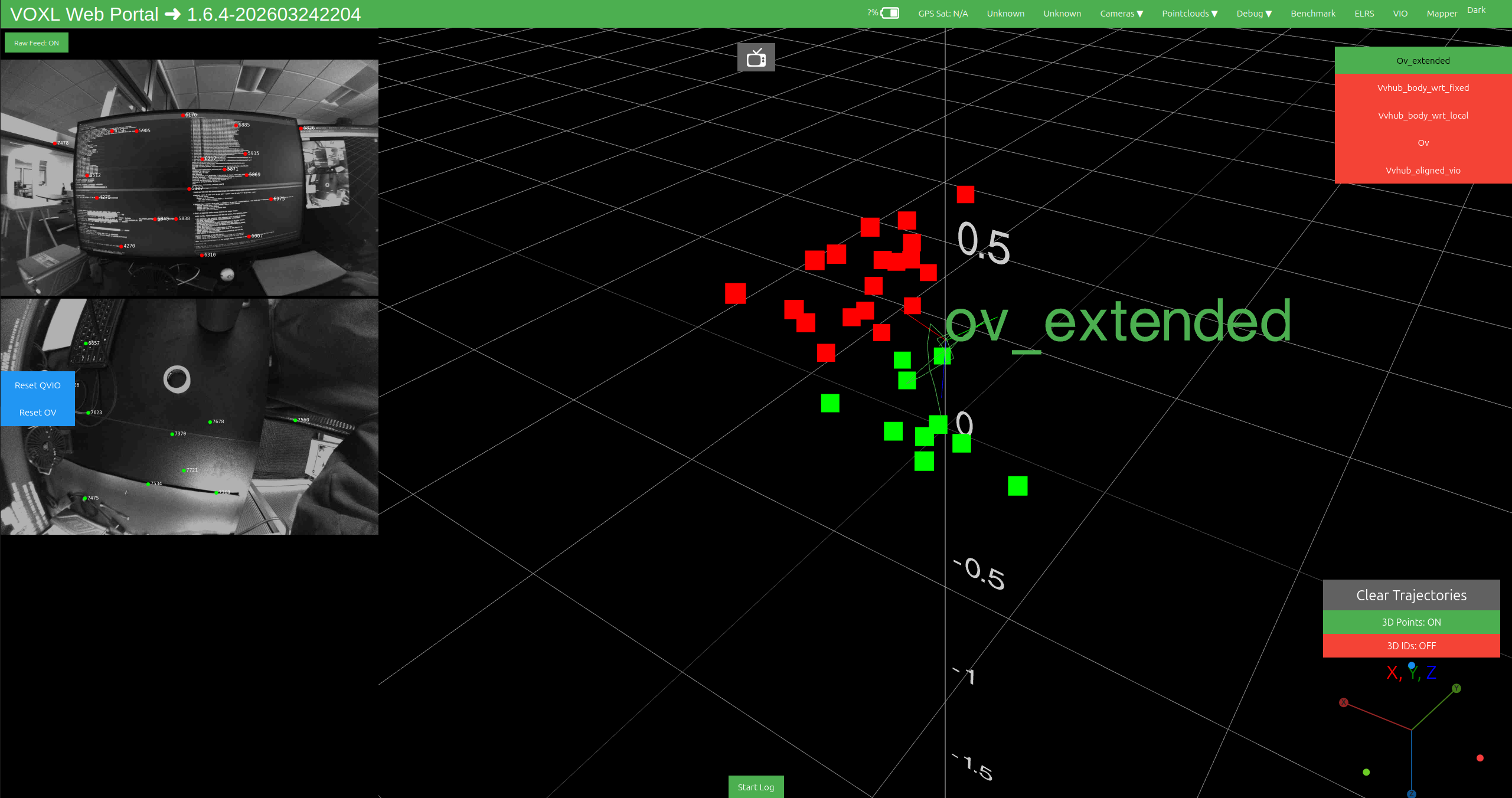
- Check roll, pitch, and yaw by selecting
ov_extendedorvvhub_wrt_localin the VIO tab. Move the drone around in 3D space, verifying distance readings are accurate.
Position and orientation can also be viewed directly in the terminal with
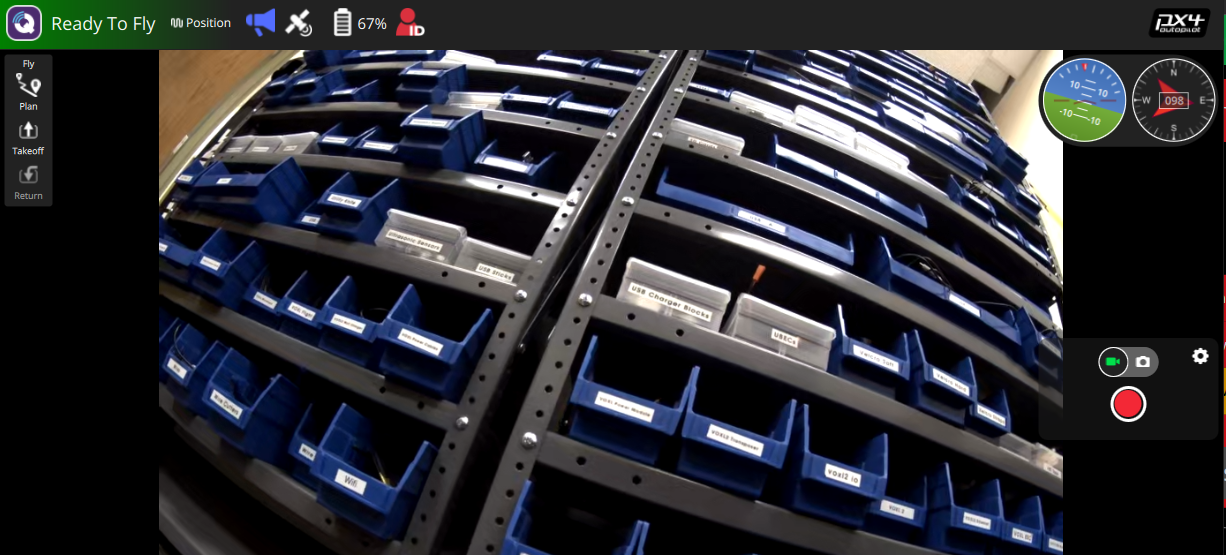
voxl-inspect-vins:voxl2:/$ voxl-inspect-vins dt(ms) | T_imu_wrt_vio (m) |Roll Pitch Yaw (deg)|features|quality| state| error_codes 33.3 | 0.05 -0.03 0.12| 4.1 -2.6 0.6| 45 | 95% | OKAY |Verify in QGroundControl that the drone shows “Ready to Fly” in Position mode.
- If tracking looks correct, proceed to flight testing. If not, double-check your
extrinsics.conf. You can isolate cameras by disabling them one at a time invio_cams.conf.
Flight Testing
You must complete hand testing before flight to avoid fly-aways from bad extrinsics or incorrect parameters.
- SSH or ADB shell into the VOXL 2.
- Start the service:
systemctl restart voxl-open-vins-server - Open QGroundControl and connect to the VOXL 2.
- Verify QGC shows “Ready to Fly”.
- Ensure the drone is in Position flight mode and begin flying.
- Test roll, pitch, yaw maneuvers and hover in place for several seconds to verify tracking stability.
- If everything is stable, continue normal flight operations with OpenVINS.
Troubleshooting
For general service debugging — logs, restarts, running in the foreground — see Debugging Services.
No config file
If voxl-open-vins-server.conf does not exist, run:
voxl-configure-open-vins <camera_configuration>
Server fails to start
- Check that
voxl-camera-serverandvoxl-imu-serverare running and providing data. - Verify camera intrinsics files exist in
/data/modalai/. - Verify extrinsics are configured:
cat /etc/modalai/extrinsics.conf. - Check the journal for error details:
journalctl -u voxl-open-vins-server -n 50.
VIO quality is poor or resets frequently
- Increase
auto_reset_min_feature_timeout_sto allow more time before feature-count resets. - Verify cameras have clear field of view with sufficient texture.
- Check for vibration issues. Excessive IMU vibration degrades the estimator.
- If using occluded cameras, verify
takeoff_alt_thresholdmatches your takeoff environment. - Tune quality hysteresis thresholds if transitions between GOOD and BAD are too sensitive.
IMU body frame errors
If you see Failed to fetch body->imu_apps extrinsic, add the body -> imu_apps relationship to your extrinsics.conf.
Legacy Parameter Notes
The following parameters from older versions of voxl-open-vins-server.conf have been removed. They are either handled internally, moved to OpenVINS YAML configs, or no longer applicable:
| Removed Parameter | Notes |
|---|---|
en_vio_always_on | VIO now initializes via jerk detection and does not require arming. No longer needed |
en_ext_feature_tracker | External feature tracker support removed; tracking is handled internally via OpenCL |
en_gpu_for_tracking | GPU/DSP tracking replaced by OpenCL-based tracking in all configurations |
histogram_method | Moved to OpenVINS estimator_config.yaml |
use_mask | Masking configuration moved to OpenVINS YAML configs |
en_force_init | Initialization is now handled by the jerk detection system in FrameTransform |
max_slam_features | Moved to OpenVINS estimator_config.yaml as max_slam |
max_slam_in_update | Moved to OpenVINS estimator_config.yaml |
max_msckf_in_update | Moved to OpenVINS estimator_config.yaml |
en_force_ned_2_flu | Replaced by imu_body_frame_mode and extrinsic-based frame transformation |
takeoff_occlude_stereo_left | No longer read. Use is_occluded_on_ground in vio_cams.conf with takeoff_alt_threshold |
takeoff_occlude_stereo_right | No longer read. Use is_occluded_on_ground in vio_cams.conf with takeoff_alt_threshold |
takeoff_cam | Takeoff camera is now automatically determined from is_occluded_on_ground in vio_cams.conf |
takeoff_threshold | Renamed to takeoff_alt_threshold |
auto_reset_max_v_cov, auto_reset_max_v_cov_instant | Removed. Velocity-uncertainty auto-reset is driven by the sustained-quality timeout (auto_reset_max_v_cov_timeout_s); the instantaneous check depended on an arming signal that was never wired |
auto_fallback_timeout_s, auto_fallback_min_v | Removed. Fallback-mode logic was never implemented; the parameters had no effect |
en_cont_yaw_checks | Removed. Spinning-in-place detection is always on, tuned by fast_yaw_thresh / fast_yaw_timeout_s |
fusion_rate_dt_ms | Removed. There is no fusion loop anymore — cameras feed the estimator’s lock-free ingest directly and publishing follows each estimator update |
API Reference
For detailed C++ API documentation including class hierarchies, call graphs, and source code reference, see the Doxygen API Documentation.