
Using VOXL ESCs with PX4
Configure PX4 on VOXL 2, VOXL Flight, or Flight Core to drive VOXL UART ESCs.
Table of contents
- Overview
- PX4 1.14 and Newer (VOXL 2, VOXL 2 Mini)
- PX4 1.13 and Older
- Debugging Tips
- ESC Telemetry and Battery Status
- Development
Overview
The VOXL 2, VOXL Flight and Flight Core systems provides the ability to easily and quickly interface with UART ESCs. The following guide provides you the necessary details on doing so.
PX4 1.14 and Newer (VOXL 2, VOXL 2 Mini)
The modal_io driver was renamed to voxl_esc starting in SDK 1.1.1 and voxl-px4 version 1.14.0-2.0.58 or newer, additional information can be found in the release notes. The voxl_esc driver is used to interface with the VOXL ESC and can be configured using the QGroundControl Actuators tab or manually using the command line on target.
SDK 1.8 ships PX4 1.18; SDK 1.1.1 through 1.6 ship PX4 1.14. The driver is located at src/drivers/actuators/voxl_esc (PX4 1.14: voxl-dev branch).
Actuator Setup using QGC
Example Screen Shot with Labels
- we’ve not yet seen the “Identify & Assign Motors” work with any flight controller at the time of this writing so please do not rely on using this.
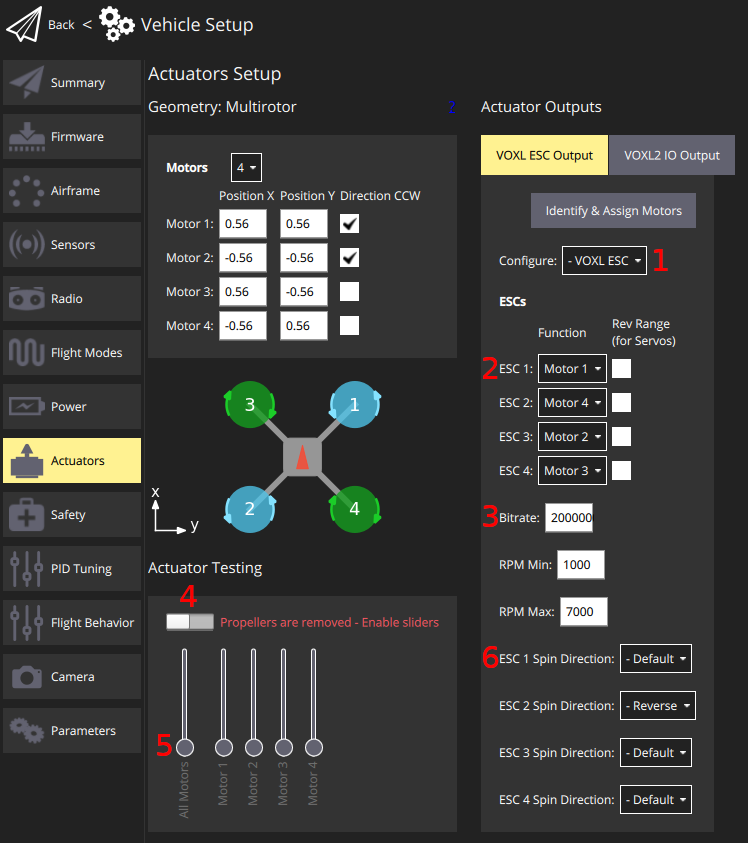
Instructions using QGC
- Click on the Actuators tab
- In the Configure drop down (#1 in graphic above), select
VOXL ESC- reboot the vehicle
- Inspect the wiring of your ESC to motors, e.g.:
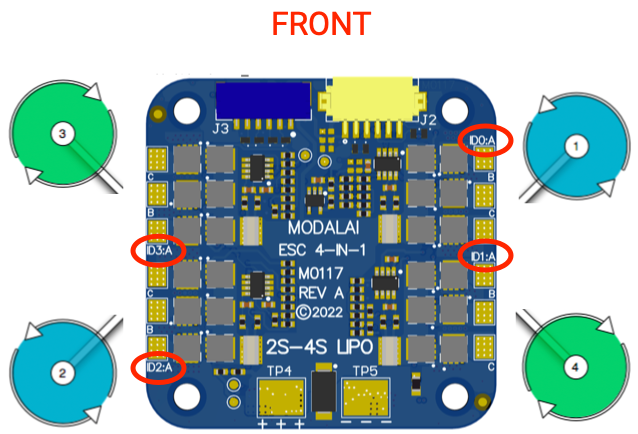
- Use this for configuring the ESC Function (#2 in graphic). Note the silkscreen is 0 based… In the following example we have:
- silksreen ID0 –> ESC 1 –> wired to PX4 motor 1 –>
ESC 1 = Motor 1 - silksreen ID1 –> ESC 2 –> wired to PX4 motor 4 –>
ESC 2 = Motor 4 - silksreen ID2 –> ESC 3 –> wired to PX4 motor 2 –>
ESC 3 = Motor 2 - silksreen ID3 –> ESC 4 –> wired to PX4 motor 3 –>
ESC 4 = Motor 3
- silksreen ID0 –> ESC 1 –> wired to PX4 motor 1 –>
- Do not use “Rev Range” option
- Configure the Bitrate if needed (#3). For VOXL2, the default is
2000000, for FCv1/v2, use250000. - Configure the RPM Min and RPM Max based on your motor selection
- The ESC Command Type and ESC Minimum Power entries correspond to the
VOXL_ESC_CMDandVOXL_ESC_PWR_MINparams below - Using the Actuator Testing section, you can enable using a slider (#4) and use the motor sliders (#5) to spin the motors manually
- Note: currently VOXL2 needs to use command line for this
- If needed, change the ESC Spin Direction for a given ESC ID (#6)
Actuator Setup Using Command Line
- Configure mapping using
VOXL_ESC_FUNCXparams, where:- Motor 1 =
101 - Motor 2 =
102 - Motor 3 =
103 - Motor 4 =
104
- Motor 1 =
- In the above example, we’d have:
VOXL_ESC_CONFIG = 1
VOXL_ESC_MODE = 0
VOXL_ESC_FUNC1 = 101
VOXL_ESC_FUNC2 = 104
VOXL_ESC_FUNC3 = 102
VOXL_ESC_FUNC4 = 103
VOXL_ESC_SDIR1 = 0
VOXL_ESC_SDIR2 = 0
VOXL_ESC_SDIR3 = 1
VOXL_ESC_SDIR4 = 0
VOXL_ESC_RPM_MAX = 8000
VOXL_ESC_RPM_MIN = 3000
Actuator Testing Using Command Line
To spin motor 1 at 10% for 1 second, the following command can be used, in which we’d expect the front right motor to spin:
actuator_test set -m 1 -v 0.1 -t 1(on VOXL 2, the command is prefixed:
px4-actuator_test set -m 1 -v 0.1 -t 1)You can also drive an ESC directly through the driver, for example 1000 RPM for 64 command cycles on ESC ID 0:
voxl_esc rpm -i 0 -r 1000 -n 64
PX4 Params
The following are the PX4 parameters that are used by the voxl_esc driver:
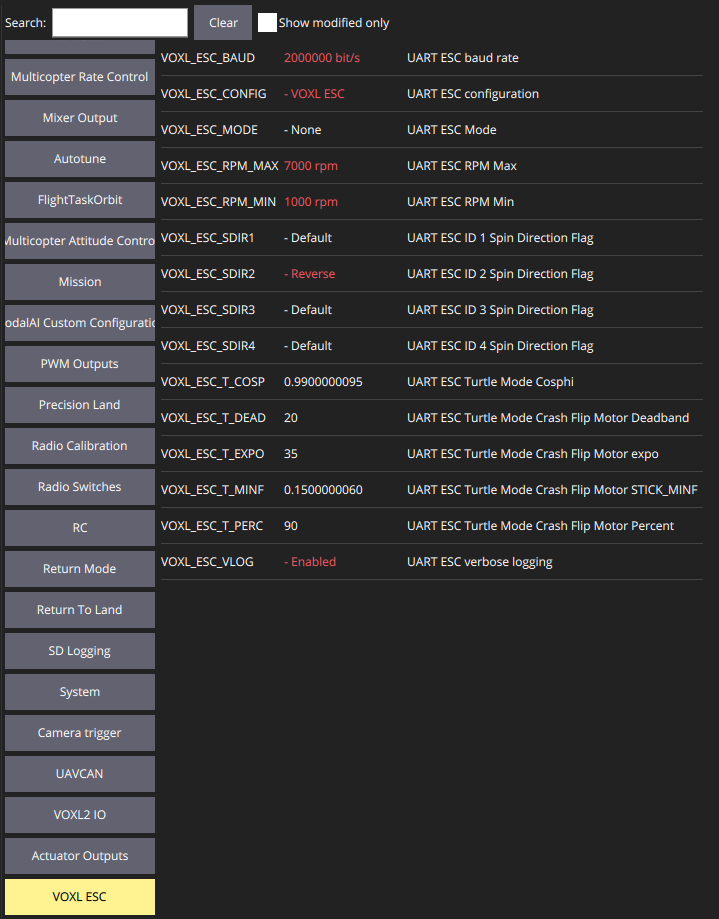
| Name | Description | Min > Max (Incr.) | Default | Units |
|---|---|---|---|---|
VOXL_ESC_CONFIG | UART ESC Configuration Values: - 0: Disabled - 1: VOXL ESC Reboot Required | 0 (Disabled) | ||
VOXL_ESC_BAUD | Baud rate between FlightController and Actuator | (1) | 250000 | Bits/sec |
VOXL_ESC_FUNC1 | info | 0, 101-104 | 0 | |
VOXL_ESC_FUNC2 | info | 0, 101-104 | 0 | |
VOXL_ESC_FUNC3 | info | 0, 101-104 | 0 | |
VOXL_ESC_FUNC4 | info | 0, 101-104 | 0 | |
VOXL_ESC_SDIR1 | Reverse spin direction of ESC ID 0 | 0 > 1 | 0 | |
VOXL_ESC_SDIR2 | Reverse spin direction of ESC ID 1 | 0 > 1 | 0 | |
VOXL_ESC_SDIR3 | Reverse spin direction of ESC ID 2 | 0 > 1 | 0 | |
VOXL_ESC_SDIR4 | Reverse spin direction of ESC ID 3 | 0 > 1 | 0 | |
VOXL_ESC_RPM_MAX | Maximum RPM, used by actuator output to determine thrust fullscale. | (1) | 15000 | RPM |
VOXL_ESC_RPM_MIN | Minimum RPM, used by actuator output to determine thrust fullscale. | (1) | 5500 | RPM |
VOXL_ESC_CMD | ESC command type: 0 = RPM (closed loop), 1 = PWM (open loop) | 0 > 1 | 0 | |
VOXL_ESC_PWR_MIN | Minimum power sent to the ESC | 0.05 | ||
VOXL_ESC_PUB_BST | Publish ESC battery status (voltage/current from the ESC) to PX4 | 0 > 1 | 1 | |
VOXL_ESC_T_WARN | ESC temperature warning threshold, 0 = disabled | 0 | deg C | |
VOXL_ESC_T_OVER | ESC over-temperature threshold, 0 = disabled | 0 | deg C | |
VOXL_ESC_VLOG | Enable verbose logging from the driver | 0 > 1 | 0 | |
VOXL_ESC_GPIO_CH | RC AUX channel (1 = AUX1 through 6 = AUX6) that drives the ESC GPIO output, 0 = disabled. Named GPIO_CTL_CH in SDK 1.6 and older. Reboot Required | 0 > 6 | 0 |
The following are used to control “Turtle Mode” (flip over after crash, which is currently in test):
| Name | Description | Min > Max (Incr.) | Default | Units |
|---|---|---|---|---|
VOXL_ESC_MODE | UART ESC Mode: Values: - 0: None - 1: Turtle Mode enabled via AUX1 - 2: Turtle Mode enabled via AUX2 - 3: UART Passthrough Mode Reboot Required | 0 > 3 | 0 | |
VOXL_ESC_T_PERC | Turtle Mode Crash Flip Motor Percent (percentage of motor range to use in flip over mode) | 1 > 100 (1) | 90 | Percentage (as int) |
VOXL_ESC_T_DEAD | Percentage of fullscale RPM that is in a deadband when in Turtle mode | 1 > 100 (1) | 20 | Percentage (as int) |
VOXL_ESC_T_MINF | Minimum stick percentage in the dead zone needed to move | 0.0 > 1.00 (0.01) | 0.15 | Percentage (as float) |
VOXL_ESC_T_EXPO | Flip power expo value | 1 > 100 (1) | 35 | Percentage (as int) |
VOXL_ESC_T_COSP | Value used to specify the sensitivity for isolating a single motor for spinning | 0.000 > 1.000 (0.001) | 0.990 | Percentage (as float) |
VOXL_ESC_T_ON | (SDK 1.8 and newer) Button index in the MAVLink MANUAL_CONTROL buttons field that activates Turtle Mode. Only used when the manual control source is MAVLink; with RC, the AUX channel selected by VOXL_ESC_MODE is used. -1 = disabled. Reboot Required | -1 > 15 | -1 |
PX4 1.13 and Older
Overview
This feature is currently in developer preview and requires loading the PX4 firmware from a branch.
- VOXL Flight or Flight Core with this branch
- A ModalAI UART ESC VOXL ESC v2, PN: MDK-M0049-1-01 - 4-in-1 UART ESC (gen2)
- UART ESC Serial Cable MCBL-00013-1
Video Tutorial
For those of you who prefer videos, we have a video tutorial here that covers the software configuration and usage. Note, you’ll want to look at the hardware connections below as that part is skipped in this video.
TL;DR
Hardware Connections
The guide here describes the connectivity: VOXL ESC v2 Manual
PX4 Setup (1.13 and older)
Enable UART ESC
To enable the UART ESC feature, set the UART_ESC_CONFIG parameter to a value of 1 and power cycle the vehicle.
You can use QGroundControl’s Parameter feature to query and modify the UART_ESC params.
The remainder of the settings can be left as default if you followed the hardware connections described in the previous section.
TELEM3
The UART ESC uses /dev/ttyS1, same as TELEM3. On bootup, if any MAVLink instance is configured to use TELEM3, it will be disabled via boards/modalai/fc-v1/init/rc.board_defaults.
PX4 Params (1.13 and older)
See the params section above, replacing the VOXL_ESC prefix with UART_ESC — for example VOXL_ESC_CONFIG in 1.13 and older is UART_ESC_CONFIG.
RGB LED Codes
This is currently a work in progress. The standard LED codes should output to the all the LED channels in a similar way as other PX4 RGB LED peripherals with the exception that the breathing pattern is replaced by a fast blink.
Debugging Tips
Setting Up PX4 Motor ID to UART_ESC_MOTORX
Say you have the following:
M0049 silkscreen ID0 channel –> wired to a motor at PX4 Motor ID 2 M0049 silkscreen ID1 channel –> wired to a motor at PX4 Motor ID 3 M0049 silkscreen ID2 channel –> wired to a motor at PX4 Motor ID 1 M0049 silkscreen ID3 channel –> wired to a motor at PX4 Motor ID 4
Then you would have the following params set:
UART_ESC_MOTOR1 = 2 UART_ESC_MOTOR2 = 3 UART_ESC_MOTOR3 = 1 UART_ESC_MOTOR4 = 4
And you can test by spinning, for example, 1000 RPM for 64 command cycles:
# spin PX4 motor #1 (legacy 1.13 modalai_esc driver syntax)
modalai_esc -i 1 -r 1000 -n 64 rpm

# on current PX4, the equivalent through the voxl_esc driver is:
voxl_esc rpm -i 0 -r 1000 -n 64
ESC Telemetry and Battery Status
Each ESC channel streams telemetry (RPM, voltage, current, temperature, applied power) back over the shared UART. The four channels report round-robin at one quarter of the PX4 update rate — on VOXL 2, PX4 runs at 800Hz, so each channel reports at 200Hz. The voxl_esc driver publishes this as esc_status (note that PX4 logs it at a lower rate than it arrives).
Which channels measure current
| ESC | Current sensing |
|---|---|
| VOXL 4-in-1 ESC (M0117, M0134) | Per-channel current on every ESC |
| VOXL Mini ESC (M0129) | Total board current only, reported by channel 3 — other channels always read 0.00A |
| VOXL FPV ESC (M0138) | Total board current only, reported by channel 2 — other channels always read 0.00A |
This is by design, not a fault — on M0129/M0138 the per-channel current fields are simply not populated. On VOXL 2 with the FPV ESC, the total also includes the VOXL 2’s own current draw.
battery_status from the ESC
On boards with total-current sensing, the reporting channel emits an extra telemetry message carrying battery voltage and total current. When VOXL_ESC_PUB_BST is 1, the driver publishes it as battery_status — use this when the ESC also powers the system and there is no separate power module. When a power module (APM) is used, set VOXL_ESC_PUB_BST to 0 and let the voxlpm driver own battery reporting (POWER_MANAGER=VOXLPM in /etc/modalai/voxl-px4.conf; the Mini-ESC configuration is the exception since the ESC’s regulator powers the system). See the ESC FAQ for the full no-battery_status checklist.
A quick bench check that battery telemetry is flowing (props off, PX4 stopped):
cd /usr/share/modalai/voxl-esc-tools
./voxl-esc-spin.py --id 255 --power 0
--id 255 addresses all detected channels; watch for BOARD_VOLTAGE and BOARD_CURRENT in the output. The battery message is emitted only by the current-sensing channel, so --id 2 (M0138) or --id 3 (M0129) shows the same fields from that channel alone.
For PX4 to publish the result as battery_status, BAT1_SOURCE must be 0 (Power Module) in addition to VOXL_ESC_PUB_BST = 1; with BAT1_SOURCE set to 2 (ESCs) the topic is not published. See the ESC FAQ for the full battery telemetry setup.
RPM limits: PX4 and ESC params must match
VOXL_ESC_RPM_MIN / VOXL_ESC_RPM_MAX in PX4 must equal the min_rpm / max_rpm in the ESC params. The PX4 values do not override the ESC — the ESC caps incoming commands itself — but a mismatch silently mis-scales PX4’s 0-100% thrust mapping.
Motor mapping and direction
The ESC’s channel numbering differs from PX4’s motor numbering. Map channels with VOXL_ESC_FUNC1-FUNC4 and reverse individual directions with VOXL_ESC_SDIR1-SDIR4, then confirm with an actuator test, props off.
Reviewing ESC data in flight logs
The standard PX4 Flight Review does not plot the VOXL ESC’s custom telemetry. ModalAI maintains a fork of flight-review that adds plots for commanded vs actual RPM, ESC temperatures, per-motor currents (where measured), and total battery current — use it when debugging ESC behavior from logs.
Development
The PX4 Driver source code can be found on github