
MVX AR Waypoints & ATAK CoT
What AR waypoint and ATAK CoT overlays do on the MVX link, and which airframes support them.
AR waypoints draw world-anchored markers over the live video in the goggles, so the pilot sees where a point is in the camera view instead of only on a map:
- HOME: the drone’s home position.
- Mission waypoints: the waypoints of the mission loaded from a ground station or ATAK.
- ATAK CoT points: Cursor on Target points shared on the ATAK network, received by the VRX and drawn on the video.
Markers are placed using the drone’s position and attitude and the calibrated camera, and they stay anchored as the drone and camera move. ADVANCED > AR WAYPOINTS in the drone’s OSD menu turns each marker type on or off, and CLEAR ALL WAYPOINTS removes mission and CoT markers.
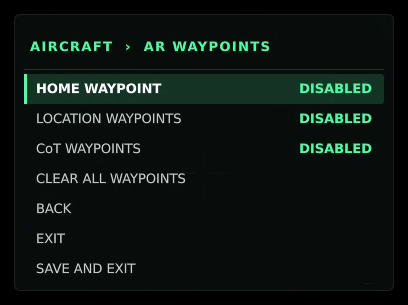
AR waypoints need camera calibration and camera mounting data for the specific airframe, plus a GPS fix. In SDK 1.8.1 they are supported on ModalAI’s Seeker platforms. Stinger and the VTX Air Unit are not supported yet; on them the AR WAYPOINTS menu shows UNSUPPORTED VEHICLE SKU.