VOXL Open-VINS Server
voxl-open-vins-server is a multi-camera visual-inertial odometry (VIO) service for the VOXL 2 platform. It uses an MSCKF-based estimator derived from OpenVINS to fuse data from up to 3 tracking cameras and an IMU, producing real-time pose and velocity estimates that are forwarded to the autopilot as odometry data.
The server is built around three modular subsystems: VoxlCore (configuration, housekeeping, publishing), VoxlCam (camera management and feature tracking via OpenCL), and VoxlIMU (IMU data acquisition and frame transformation). Data flows through ModalAI’s MPA pipe architecture, which decouples sensor producers from VIO consumers and downstream clients.
Table of contents
- Architecture
- Prerequisites
- Installation and Setup
- Configuration Files
- MPA Pipes
- Command-Line Options
- Client Tools
- Testing
- Troubleshooting
- Legacy Parameter Notes
- API Reference
Architecture
System Overview
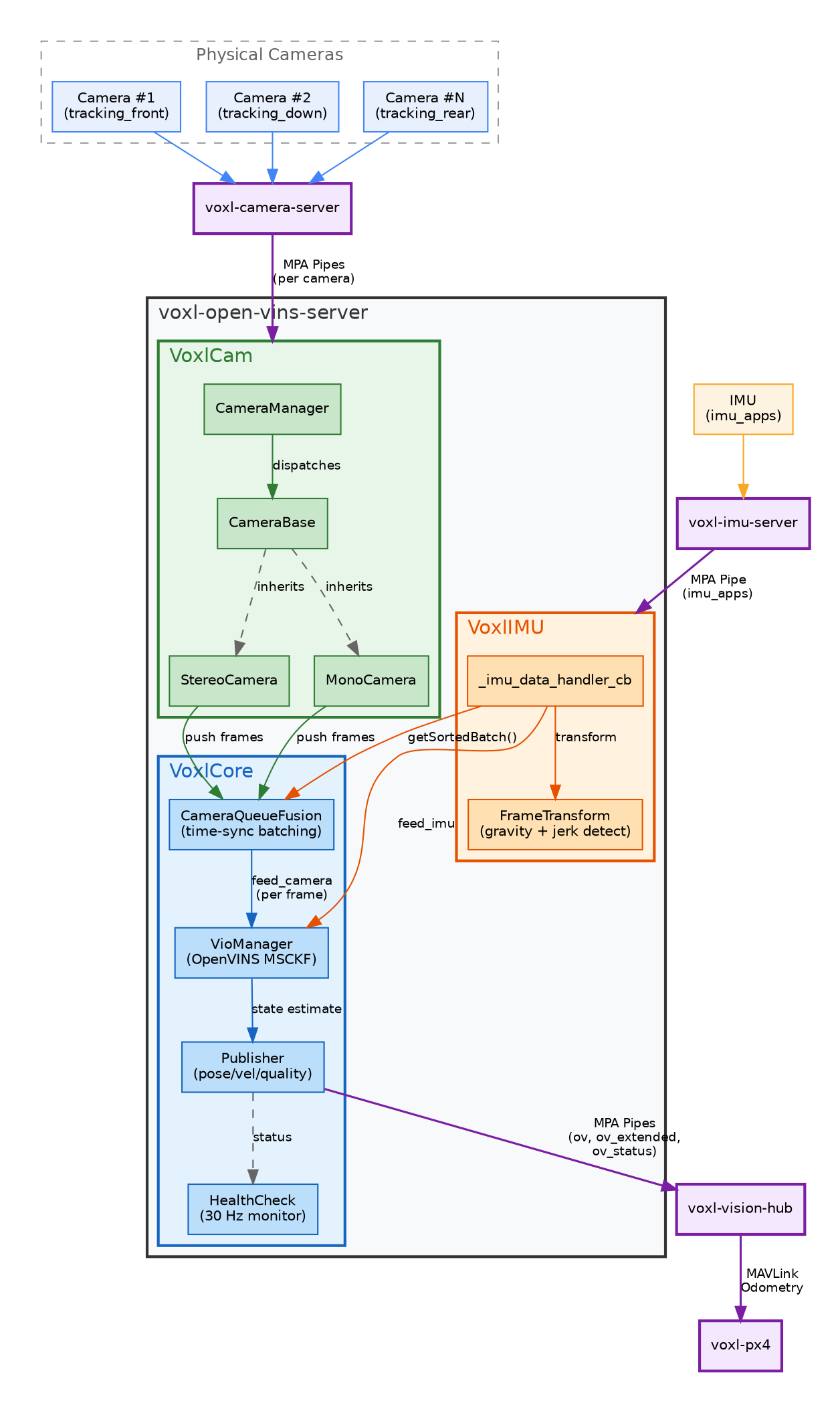
The server follows an IMU-driven fusion pattern where IMU data arrival triggers synchronized processing of camera frames:
- IMU data arrives via MPA pipe and is buffered by
VoxlIMU. TheFrameTransformmodule detects gravity direction and jerk events for initialization. - Camera frames arrive through per-camera MPA pipes.
CameraManagerdispatches frames toMonoCameraorStereoCamerainstances (based on configuration), which push processed frames intoCameraQueueFusion. - Each IMU callback triggers
CameraQueueFusion::getSortedBatch()to retrieve time-synchronized camera frames, which are fed alongside IMU data to the OpenVINS VioManager MSCKF estimator. - Publisher formats the resulting state (pose, velocity, quality, error codes) with coordinate frame transformation (OpenVINS → FRD) and writes to output pipes.
- HealthCheck runs at 30 Hz, monitoring connectivity, error codes, and auto-reset conditions.
Data Flow
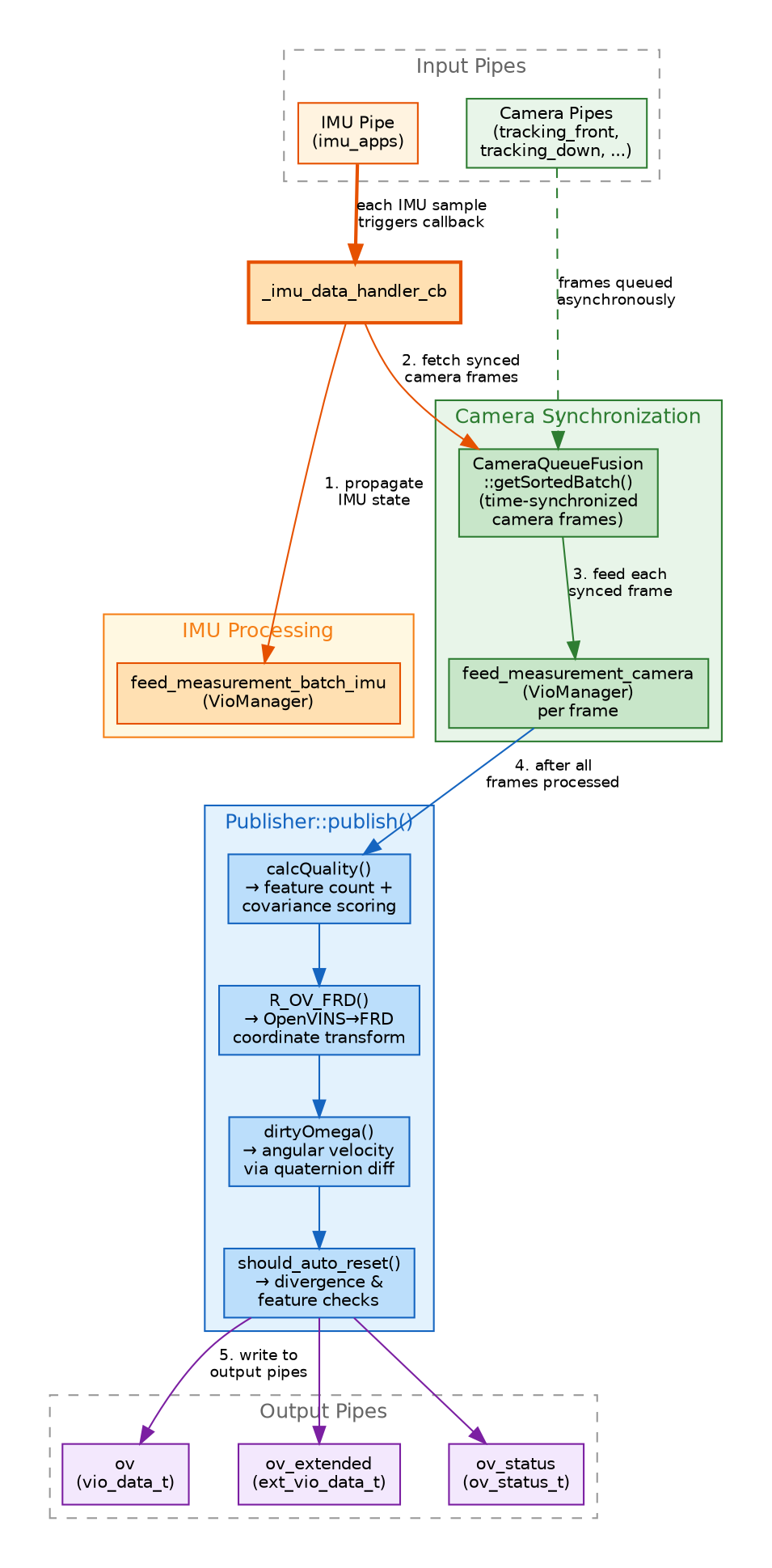
IMU callback data flow: each IMU sample triggers _imu_data_handler_cb, which propagates IMU state, fetches time-synchronized camera frames via CameraQueueFusion::getSortedBatch(), feeds them to the VioManager, and publishes the resulting estimate through Publisher::publish().
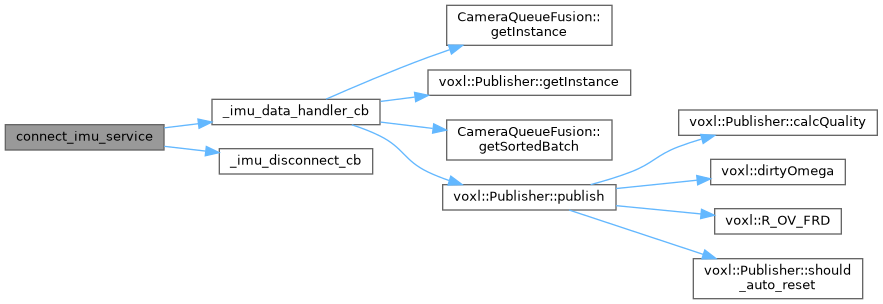
IMU callback call graph (from Doxygen API): shows connect_imu_service → _imu_data_handler_cb → CameraQueueFusion::getSortedBatch → Publisher::publish with all sub-calls.
Module Dependencies
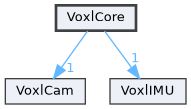
| Module | Key Classes | Responsibility |
|---|---|---|
| VoxlCore | Publisher, HealthCheck, CameraQueueFusion, VioManager | Main loop, configuration, publishing, health monitoring, multi-camera fusion |
| VoxlCam | CameraManager, CameraBase, MonoCamera, StereoCamera | Camera pipe subscription, image processing, per-camera queuing |
| VoxlIMU | FrameTransform, _imu_data_handler_cb | IMU pipe subscription, frame transformation, jerk detection |
Camera Class Hierarchy
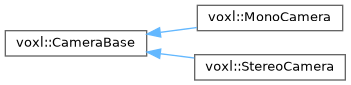
CameraBase is the abstract base class. MonoCamera handles single-camera pipes, StereoCamera handles stereo pairs. Both push CameraData into lock-free SPSC queues consumed by CameraQueueFusion.
Initialization Flow
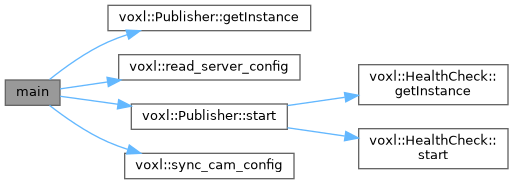
main() call graph: reads config, syncs camera calibration, starts Publisher (which starts HealthCheck), then enters the event loop.
Prerequisites
- VOXL 2 hardware
- VOXL SDK 1.4.0 or later
- All tracking cameras calibrated (intrinsics files present in
/data/modalai/) - Extrinsics configured in
/etc/modalai/extrinsics.conf(see Configure Extrinsics) - Camera feeds verified in voxl-portal before enabling VIO
Installation and Setup
Install
If you are working on a non-development drone, back up configuration and intrinsic files first:
/etc/modalai
/data/modalai
Disable qvio
Only one VIO source should be active at a time. Disable qvio before starting voxl-open-vins-server:
voxl-configure-qvio disable
Generate Configuration
Run the configuration tool to create all necessary config files:
voxl-configure-open-vins <camera_configuration>
For example, voxl-configure-open-vins starling2_2cam configures a two-camera setup using front and down tracking cameras. The result should be in agreement with the three configuration files in /etc/modalai/:
voxl-open-vins-server.confvio_cams.confextrinsics.conf(if not already present)
Start the Service
systemctl restart voxl-open-vins-server
Configuration Files
Three files in /etc/modalai/ control the server:
extrinsics.conf
Defines the geometric relationship between sensors (cameras, IMU) and the body frame. See the extrinsics configuration page for details.
When imu_body_frame_mode is enabled (default), the server also reads the body -> imu_apps extrinsic to transform VIO output into the body frame. For cross-platform compatibility OVins-server has been disable for IMU non-body frames.
vio_cams.conf
Defines which camera pipes to subscribe to and how each camera participates in VIO. Example for a two-camera setup:
{
    "cams": [{
            "enable":               true,
            "name":                 "tracking_front",
            "pipe_for_preview":     "tracking_front",
            "pipe_for_tracking":    "tracking_front",
            "is_occluded_on_ground": false,
            "imu":                  "imu_apps",
            "cal_file":             "opencv_tracking_front_intrinsics.yml"
        },{
            "enable":               true,
            "name":                 "tracking_down",
            "pipe_for_preview":     "tracking_down",
            "pipe_for_tracking":    "tracking_down",
            "is_occluded_on_ground": true,
            "imu":                  "imu_apps",
            "cal_file":             "opencv_tracking_down_intrinsics.yml"
        },{
            "enable":               false,
            "name":                 "tracking_rear",
            "pipe_for_preview":     "tracking_rear",
            "pipe_for_tracking":    "tracking_rear",
            "is_occluded_on_ground": false,
            "imu":                  "imu_apps",
            "cal_file":             "opencv_tracking_rear_intrinsics.yml"
        }]
}
| Field | Description |
|---|---|
enable | Whether this camera is active in the VIO pipeline |
name | Camera identifier used in logs and overlays |
pipe_for_tracking | MPA pipe name to subscribe to for feature tracking frames. Can differ from the preview pipe (e.g. tracking_front_misp_norm or tracking_front_misp_grey) depending on which image processing yields the best features for your application |
pipe_for_preview | MPA pipe name used for overlay visualization |
is_occluded_on_ground | If true, this camera’s view is obstructed while landed (e.g. a downward camera on the ground). The server will not use features from this camera until the drone reaches takeoff_alt_threshold altitude |
imu | IMU pipe name. All cameras must reference the same IMU |
cal_file | OpenCV intrinsics calibration file in /data/modalai/ |
To enable a third camera, set its enable field to true.
voxl-open-vins-server.conf
Main server configuration file. The server creates this file with default values if it does not exist. All parameters are read by read_server_config() in VoxlConfigure.cpp.
Auto-Reset Parameters
| Parameter | Type | Default | Description |
|---|---|---|---|
en_auto_reset | bool | true | Enable automatic VIO reset when divergence or low feature count is detected |
auto_reset_max_velocity | float | 20.0 | Velocity magnitude threshold (m/s) above which the system considers the estimate divergent |
auto_reset_max_v_cov_instant | float | 0.2 | Instantaneous velocity covariance threshold that triggers an immediate reset |
auto_reset_max_v_cov | float | 0.2 | Average velocity covariance threshold for sustained poor estimation |
auto_reset_max_v_cov_timeout_s | float | 0.5 | Duration (s) that velocity covariance must exceed the threshold before triggering a reset |
auto_reset_min_features | int | 1 | Minimum number of tracked features required to avoid a reset |
auto_reset_min_feature_timeout_s | float | 10.0 | Duration (s) that the feature count must stay below the minimum before triggering a reset |
State Machine and Fallback
| Parameter | Type | Default | Description |
|---|---|---|---|
ok_state_grace_timeout_s | float | 2.0 | Grace period (s) after entering OK state during which quality is held low to avoid false confidence from bad initialization |
auto_fallback_timeout_s | float | 3.0 | Duration (s) before the system falls back to a simpler tracking mode |
auto_fallback_min_v | float | 0.6 | Minimum velocity (m/s) required to trigger auto-fallback mode |
Yaw Monitoring
| Parameter | Type | Default | Description |
|---|---|---|---|
en_cont_yaw_checks | bool | false | Enable continuous yaw rate monitoring for stability validation |
fast_yaw_thresh | float | 5.0 | Threshold for detecting rapid yaw changes that may indicate tracking issues |
fast_yaw_timeout_s | float | 1.75 | Duration (s) for fast yaw detection before triggering corrective action |
OpenVINS and Camera Mode
| Parameter | Type | Default | Description |
|---|---|---|---|
yaml_folder | string | /usr/share/modalai/voxl-open-vins/VoxlConfig/starling2 | Path to the folder containing OpenVINS YAML configuration files (estimator_config.yaml, kalibr_imucam_chain.yaml) |
using_stereo | int | 0 | Set to 1 to enable stereo camera mode |
sync_config | bool | true | Sync OpenVINS YAML configs with system calibration data (intrinsics and extrinsics) on startup |
Takeoff and Occlusion
| Parameter | Type | Default | Description |
|---|---|---|---|
takeoff_alt_threshold | float | 0.5 | Altitude (m) above which cameras marked is_occluded_on_ground become active |
takeoff_occlude_stereo_left | bool | false | Occlude the stereo left camera during takeoff |
takeoff_occlude_stereo_right | bool | false | Occlude the stereo right camera during takeoff |
Fusion and Frame Settings
| Parameter | Type | Default | Description |
|---|---|---|---|
fusion_rate_dt_ms | float | 20.0 | Fusion loop interval in milliseconds (50 Hz default) |
imu_body_frame_mode | bool | true | When enabled, the server reads the body -> imu extrinsic and outputs VIO in the body frame. The IMU pipe is subscribed as imu_apps_body instead of imu_apps |
Quality Hysteresis
The server uses a state machine with hysteresis to classify VIO quality: INITIAL, GOOD, and BAD. The thresholds and transition counts below control state transitions.
| Parameter | Type | Default | Description |
|---|---|---|---|
quality_low_thresh_initial | int | 15 | Quality score threshold below which degradation is detected in INITIAL state |
quality_low_thresh_good | int | 14 | Quality score threshold below which degradation is detected in GOOD state |
quality_high_thresh | int | 35 | Quality score threshold above which recovery is detected (used for INITIAL->GOOD and BAD->GOOD transitions) |
quality_initial_to_bad_count | int | 20 | Consecutive low-quality samples required to transition from INITIAL to BAD |
quality_initial_to_good_count | int | 50 | Consecutive high-quality samples required to transition from INITIAL to GOOD |
quality_bad_to_good_count | int | 60 | Consecutive high-quality samples required to transition from BAD to GOOD |
quality_good_to_bad_count | int | 45 | Consecutive low-quality samples required to transition from GOOD to BAD |
MPA Pipes
Output Pipes
| Pipe | Type | Description |
|---|---|---|
ov_extended | ext_vio_data_t | Full VIO state including covariance matrices, feature counts, quality, and error codes |
ov | vio_data_t | Simplified VIO data with pose and velocity for basic consumers |
ov_status | ov_status_t | System status, health information, and operational state |
Publisher Pipeline
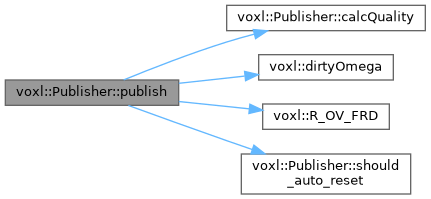
Publisher::publish() call graph: calculates quality score, computes angular velocity via dirty quaternion differentiation, applies OpenVINS→FRD coordinate transform, and checks auto-reset conditions before writing to output pipes.
Input Pipes
| Pipe | Source | Description |
|---|---|---|
imu_apps (or imu_apps_body) | voxl-imu-server | IMU data (accelerometer and gyroscope). The _body variant is used when imu_body_frame_mode is enabled |
| Camera pipes (dynamic) | voxl-camera-server | One pipe per camera defined in vio_cams.conf (e.g. tracking_front, tracking_down) |
Control Pipe
The server exposes a control pipe at /run/mpa/ov/control that accepts the following commands:
| Command | Description |
|---|---|
RESET_VIO_SOFT | Soft reset: reinitializes the VIO state without recreating the VioManager |
RESET_VIO_HARD | Hard reset: destroys and recreates the VioManager from scratch |
Control pipes are available on both the ov_extended and ov server channels.
Command-Line Options
Usage: voxl-open-vins-server [OPTIONS]

Options:
  -d, --debug     Enable debug output and detailed logging
  -v, --verbose   Enable verbose output and status information
  -c, --config    Configuration only mode (load and validate config, then exit)
  -i, --imu-body  Enable IMU body measurements (overrides conf file)
  -h, --help      Display help message
Examples:
voxl-open-vins-server              # Run with default settings
voxl-open-vins-server -d           # Run with debug output
voxl-open-vins-server -v -c        # Validate configuration only
voxl-open-vins-server --imu-body   # Force IMU body frame mode
Client Tools
voxl-reset-vins
Sends a reset command to the running server through the control pipe.
voxl-reset-vins          # Send a hard reset
voxl-reset-vins -s       # Send a soft reset
voxl-inspect-vins
Real-time terminal display of VIO data from the ov pipe. Shows position, rotation, velocity, features, quality, state, and error codes.
voxl-inspect-vins              # Default view (position, rotation, features, quality, state, errors)
voxl-inspect-vins -v           # Include velocity
voxl-inspect-vins -b           # Display values in body frame (reads body->imu extrinsic)
voxl-inspect-vins -z           # Print all fields
voxl-inspect-vins -n           # Print each sample on a new line (useful for logging)
| Flag | Description |
|---|---|
-a | Print IMU angular velocity |
-b | Print values in body frame |
-g | Print gravity vector |
-m | Print camera-to-IMU extrinsics |
-n | Print each sample on a new line |
-t | Print timestamp in nanoseconds |
-v | Print velocity |
-z | Print all fields |
voxl-log-vins
Subscribes to the ov_status pipe and logs VIO status data including error codes, state transitions, and feature statistics. Useful for post-flight analysis.
voxl-log-vins
voxl-benchmark-vio
Automated evaluation tool for VIO parameter tuning. Replays logs and records performance metrics (uptime duration, endpoint error, failure codes) across different parameter configurations.
TODO
Testing
OUTDATED TODO
Hand Testing
Hand testing verifies that extrinsics are correct and the VIO pipeline is functioning before flight. This is the recommended starting point.
Steps
- SSH or ADB shell into the VOXL 2.
- Start the service:
systemctl restart voxl-open-vins-server Open voxl-portal and navigate to Cameras > ov_overlay. You should see the tracking camera feed(s) with no feature points yet.
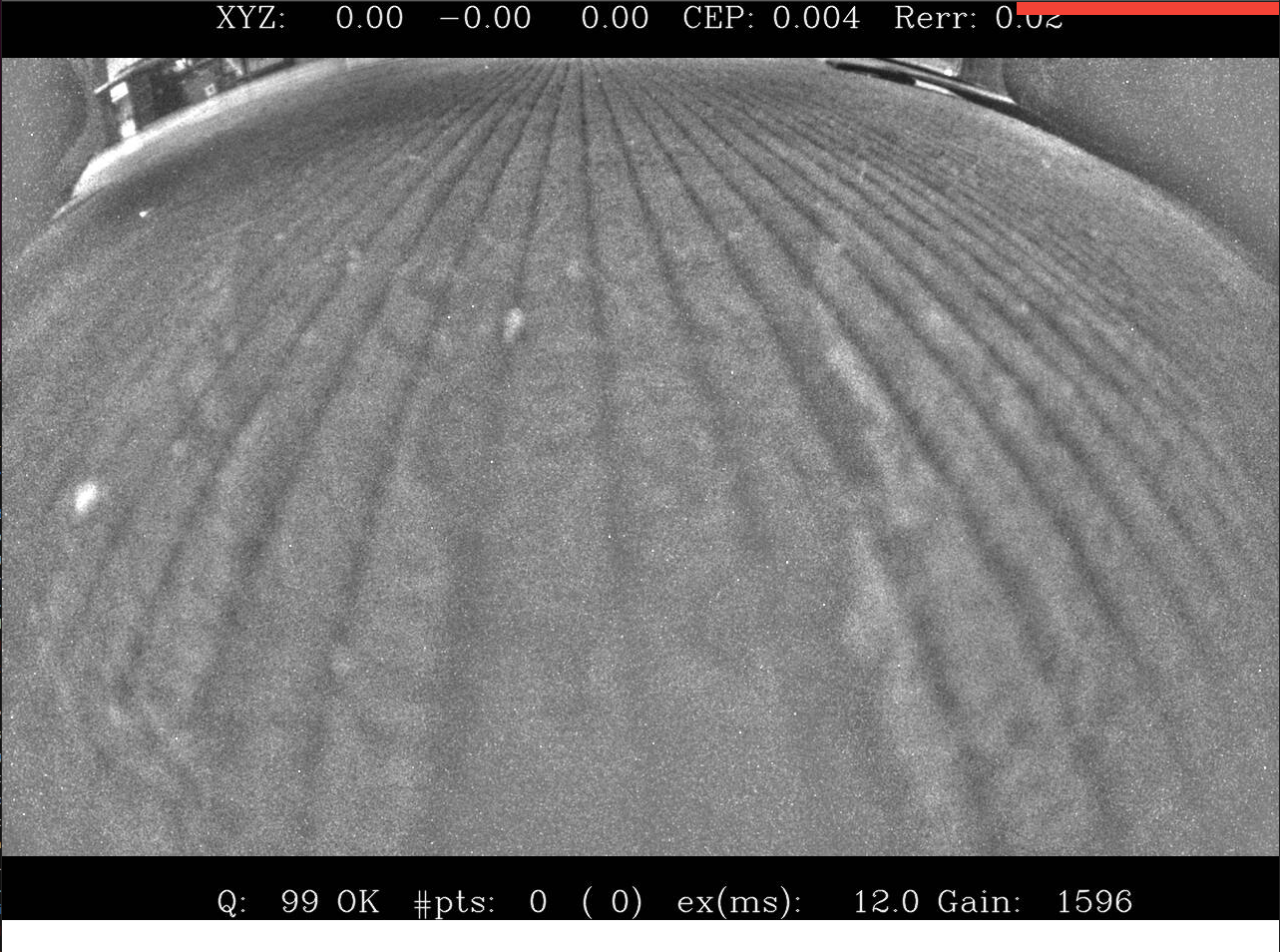
Lift the drone with a small jerk motion (simulating takeoff). Features should start populating on the overlay.
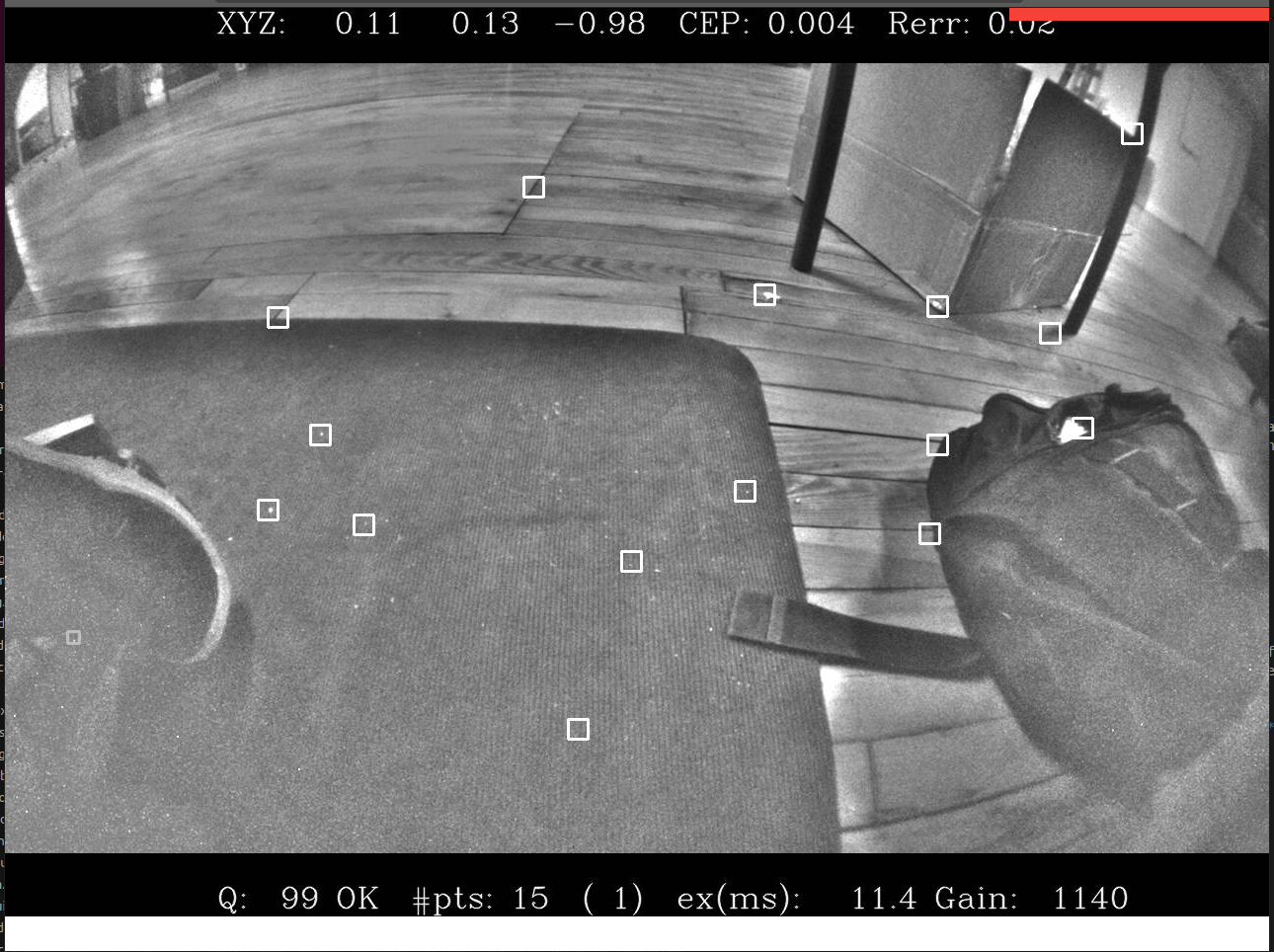
Perform translational motion: move the drone left-right, then front-back. Watch the XYZ position values.
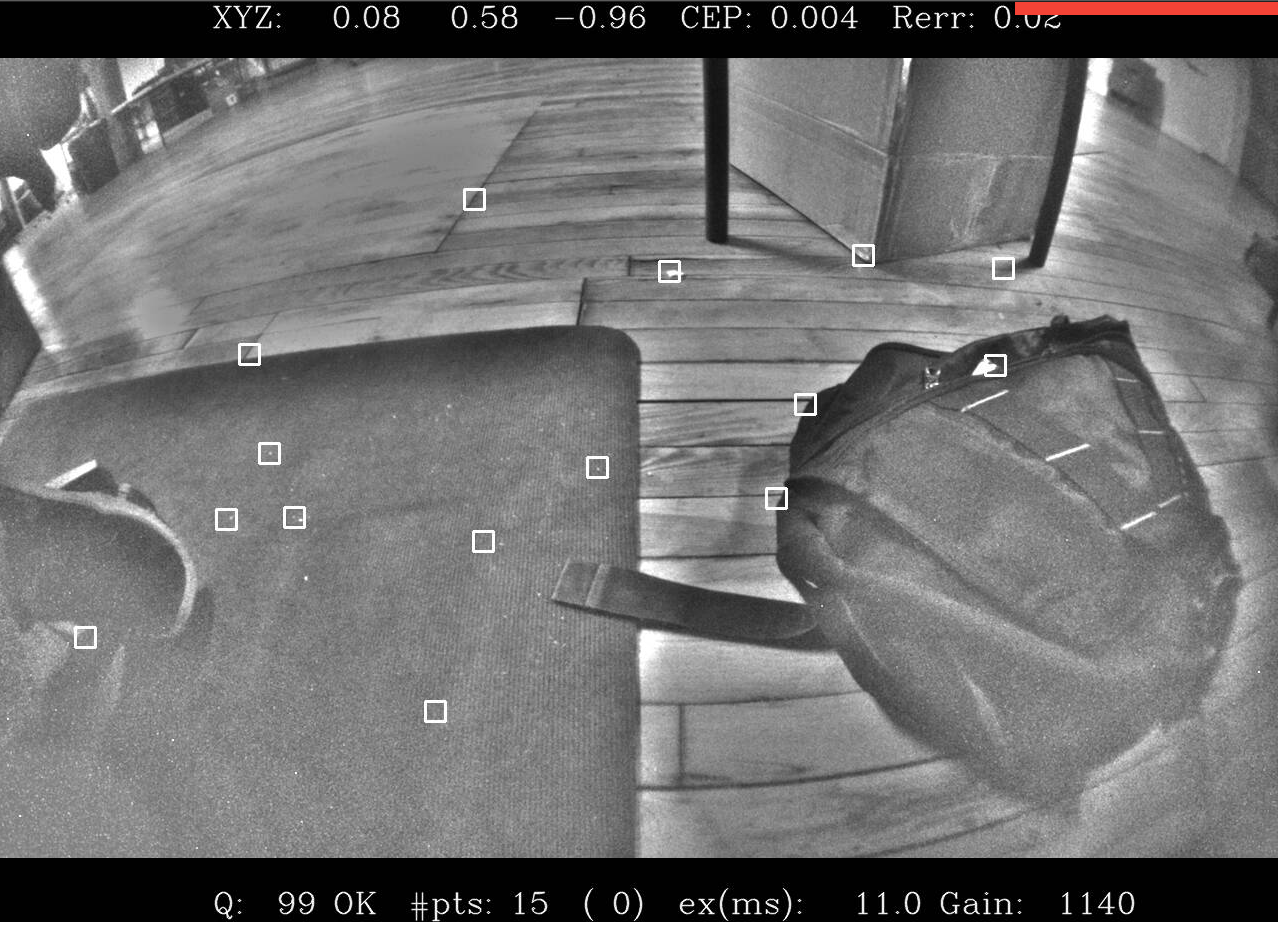
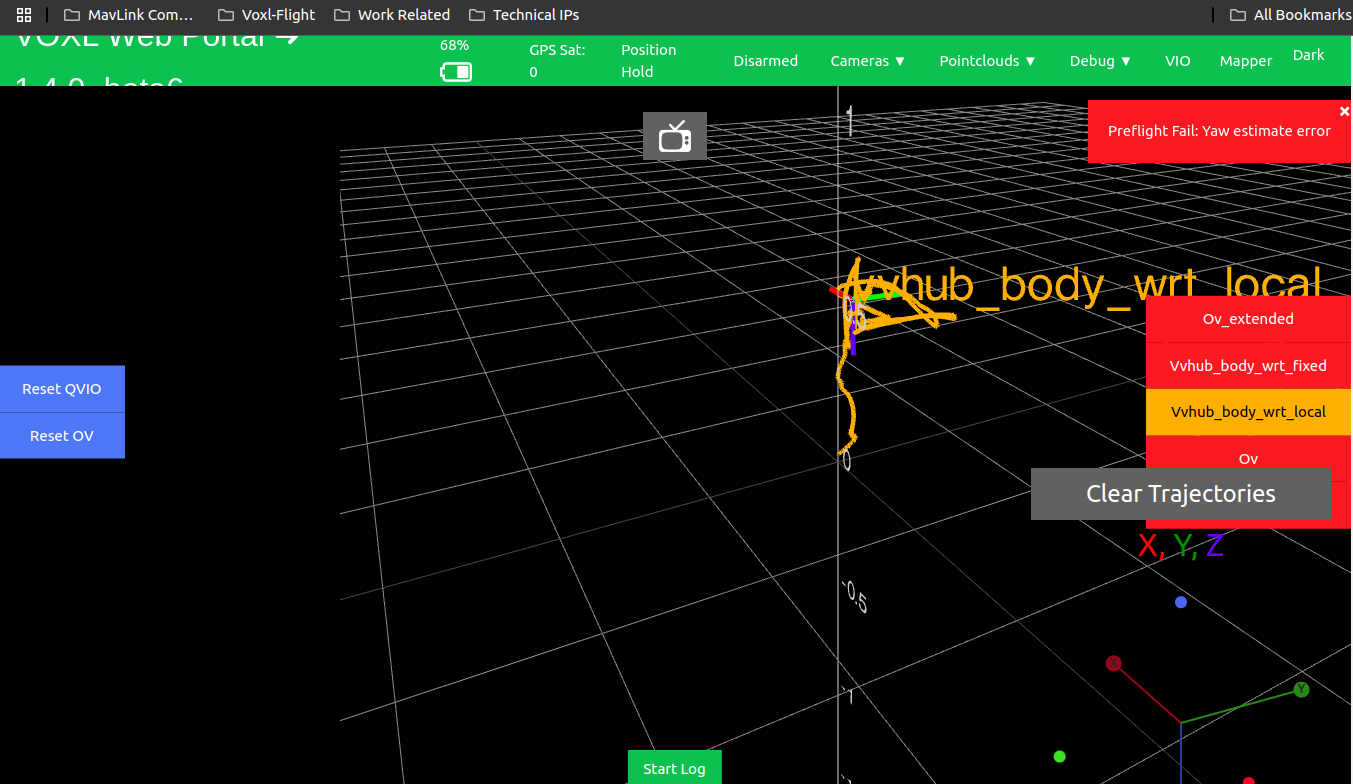
- Check roll, pitch, and yaw by navigating to the VIO tab in voxl-portal. Select
ov_extendedorvvhub_wrt_local. Move the drone around in 3D space, verifying distance readings are accurate.
You can also use
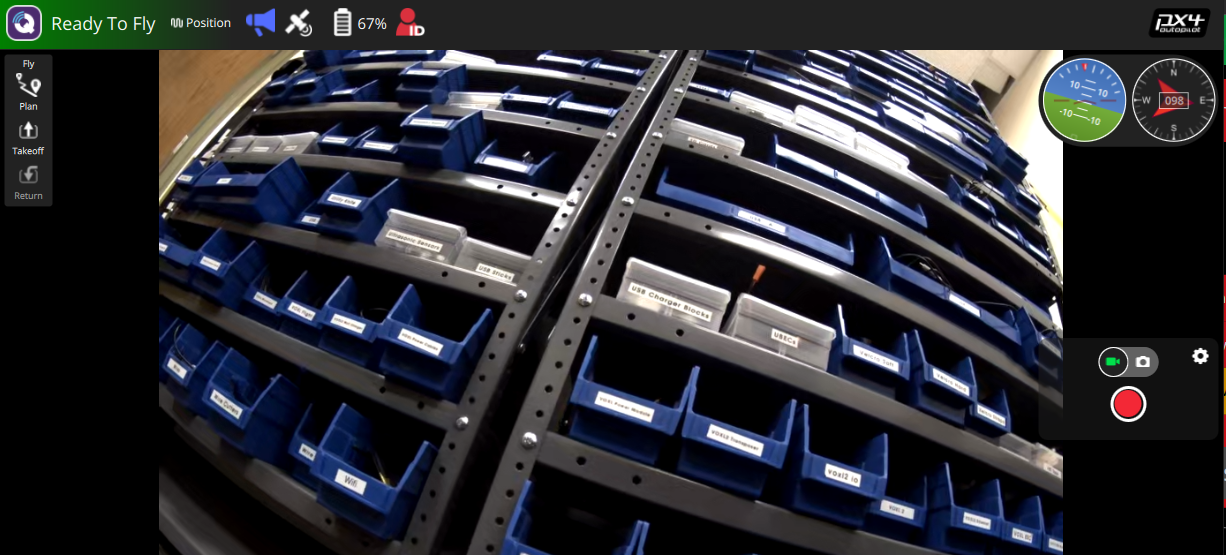
voxl-inspect-vinsin the terminal for a text-based view.Verify in QGroundControl that the drone shows “Ready to Fly” in Position mode.
- If tracking looks correct, proceed to flight testing. If not, double-check your
extrinsics.conf. You can isolate cameras by disabling them one at a time invio_cams.conf.
Flight Testing
You must complete hand testing before flight to avoid fly-aways from bad extrinsics or incorrect parameters.
- SSH or ADB shell into the VOXL 2.
- Start the service:
systemctl restart voxl-open-vins-server - Open QGroundControl and connect to the VOXL 2.
- Verify QGC shows “Ready to Fly”.
- Ensure the drone is in Position flight mode and begin flying.
- Test roll, pitch, yaw maneuvers and hover in place for several seconds to verify tracking stability.
- If everything is stable, continue normal flight operations with OpenVINS.
Troubleshooting
No config file
If voxl-open-vins-server.conf does not exist, run:
voxl-configure-open-vins <camera_configuration>
Server fails to start
- Check that
voxl-camera-serverandvoxl-imu-serverare running and providing data. - Verify camera intrinsics files exist in
/data/modalai/. - Verify extrinsics are configured:
cat /etc/modalai/extrinsics.conf. - Check the journal for error details:
journalctl -u voxl-open-vins-server -n 50.
VIO quality is poor or resets frequently
- Increase
auto_reset_min_feature_timeout_sto allow more time before feature-count resets. - Verify cameras have clear field of view with sufficient texture.
- Check for vibration issues. Excessive IMU vibration degrades the estimator.
- If using occluded cameras, verify
takeoff_alt_thresholdmatches your takeoff environment. - Tune quality hysteresis thresholds if transitions between GOOD and BAD are too sensitive.
IMU body frame errors
If you see Failed to fetch body->imu_apps extrinsic, add the body -> imu_apps relationship to your extrinsics.conf.
Legacy Parameter Notes
The following parameters from older versions of voxl-open-vins-server.conf have been removed. They are either handled internally, moved to OpenVINS YAML configs, or no longer applicable:
| Removed Parameter | Notes |
|---|---|
en_vio_always_on | VIO now initializes via jerk detection and does not require arming. No longer needed |
en_ext_feature_tracker | External feature tracker support removed; tracking is handled internally via OpenCL |
en_gpu_for_tracking | GPU/DSP tracking replaced by OpenCL-based tracking in all configurations |
histogram_method | Handled automatically based on detected camera sensor |
use_mask | Masking configuration moved to OpenVINS YAML configs |
en_force_init | Initialization is now handled by the jerk detection system in FrameTransform |
max_slam_features | Moved to OpenVINS estimator_config.yaml |
max_slam_in_update | Moved to OpenVINS estimator_config.yaml |
max_msckf_in_update | Moved to OpenVINS estimator_config.yaml |
en_force_ned_2_flu | Replaced by imu_body_frame_mode and extrinsic-based frame transformation |
takeoff_cam | Takeoff camera is now automatically determined from is_occluded_on_ground in vio_cams.conf |
takeoff_threshold | Renamed to takeoff_alt_threshold |
API Reference
For detailed C++ API documentation including class hierarchies, call graphs, and source code reference, see the Doxygen API Documentation.