M0197-FPV Hardware-in-the-Loop Simulation
Table of contents
- Overview
- Sample Repository Structure
- System Architecture
- Component Architecture
- uORB Message Definitions
- Startup Sequence
- Network Configuration
- HITL Default Parameters
- Quick Start Guide
- Prerequisites
- Step-by-Step
- 1. Install Gazebo Jetty (Host)
- 2. Install Build Dependencies (Host)
- 3. Install MAVLink C Headers (Host)
- 4. Build Gazebo Plugins (Host)
- 5. Build and Deploy voxl-hitl-vio-server (Target)
- 6. Build and Deploy voxl-fpv-px4 (Target)
- 7. Configure VOXL2/M0197 Services
- 8. Connect VOXL2/M0197
- 9. Start PX4 HITL on VOXL2/M0197
- 10. Launch Gazebo on Host
- 11. Verify
- 12. Test Flight (PX4 shell)
- Verification
- Gazebo Version Compatibility
- Headless / Remote Operation
- Troubleshooting
- References
Overview
Hardware-in-the-loop (HITL) simulation enables full-fidelity testing of the PX4 flight stack running on the VOXL2 DSP while the vehicle dynamics are simulated in Gazebo Sim on a host PC. Unlike software-in-the-loop (SITL), HITL exercises the real firmware, real sensor drivers, real EKF2 implementation, and real cross-processor communication paths — providing the highest fidelity simulation short of actual flight.
This document covers the MUORB-based HITL architecture introduced for the M0197-FPV platform, which replaces the legacy FTDI serial approach with UDP-over-USB-Ethernet.
Key advantage: The DSP runs the real flight stack (sensors, EKF2, controllers, commander) exactly as it does in flight. Only the sensor drivers are swapped for HITL shims that receive simulated data from the apps processor via MUORB. The full VOXL2/M0197 software stack is active during HITL — you get the same MPA pipes, mavlink-server telemetry, and VIO integration paths as in real flight.
Key Differences from Legacy HITL
| Feature | Legacy (FTDI Serial) | Current (UDP-over-USB) |
|---|---|---|
| Physical connection | FTDI cable to VOXL2 J18 UART | USB-C cable (power + network) |
| Bandwidth | ~921600 baud (shared with debug console) | Full USB-Ethernet (~100 Mbps) |
| Sensor data routing | Direct UART to DSP | Apps proc MAVLink -> MUORB -> DSP |
| Apps proc services | Bypassed entirely | Fully active (MPA pipes, mavlink-server, VIO) |
| VFC support | possible* | Native (via voxl-hitl-vio-server + voxl-vision-hub) |
| FTDI latency tuning | Required (latency_timer sysfs hack) | Not needed |
Sample Repository Structure
ROOT_DIR/
├── px4-gz-jetty-plugins/   # Gazebo plugins: MAVLink HITL bridge + Trajectory RC
│   ├── src/                # Plugin source (mavlink_hitl_gazebosim, trajectory_rc)
│   ├── worlds/             # Gazebo world files for HITL
│   │   ├── hitl_x500.sdf             # X500 quad HITL world
│   │   └── hitl_x500_trajectory.sdf  # X500 world with trajectory RC automation
│   └── scripts/
│       └── hitl-gz-start.sh          # Launch script for host PC
├── voxl-hitl-vio-server/   # Target-side: receives ODOMETRY UDP, writes MPA pipe
├── voxl-fpv-px4/           # PX4 firmware wrapper (submodule: px4-firmware)
    └── px4-firmware/       # PX4 with HITL startup scripts, dsp_hitl driver, x500_voxl model
System Architecture
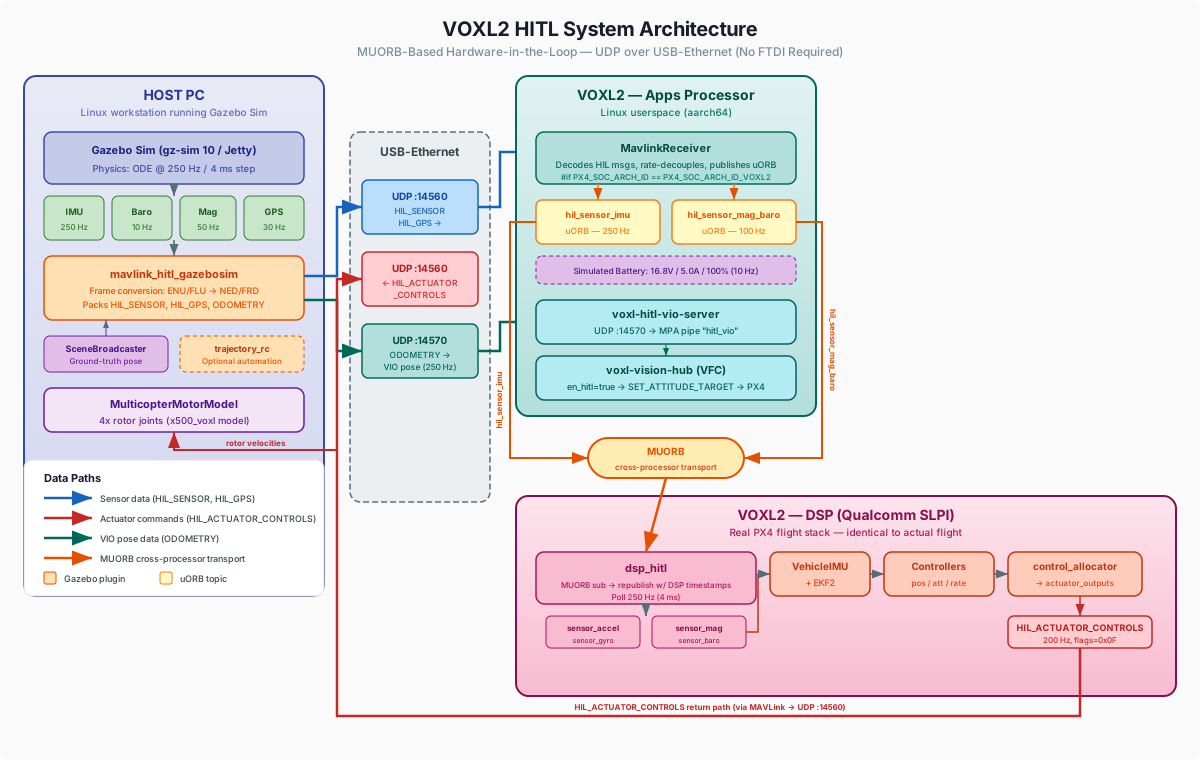
The HITL system spans three execution domains: the host PC running Gazebo Sim, the M0197/VOXL2 apps processor (Linux), and the M0197/VOXL2 DSP (Qualcomm SLPI). All inter-device communication uses UDP over the USB-Ethernet link.
Data Flow Summary
Sensor Path (Host -> VOXL2/M0197 DSP)
- Gazebo Sim generates simulated sensor readings (IMU at 250 Hz, magnetometer at 50 Hz, barometer at 10 Hz, GPS at 30 Hz) from the
x500_voxlvehicle model - mavlink_hitl_gazebosim plugin packs sensor data into MAVLink
HIL_SENSORandHIL_GPSmessages, performing ENU/FLU-to-NED/FRD frame rotation at the boundary - Messages are sent via UDP port 14560 over the USB-Ethernet link to the VOXL2/M0197 apps processor
- MavlinkReceiver (apps proc) decodes HIL messages and publishes two rate-decoupled uORB topics:
hil_sensor_imuat 250 Hz — accelerometer (m/s^2) + gyroscope (rad/s) in body FRD framehil_sensor_mag_baroat 100 Hz — magnetometer (Gauss) + barometer (Pa) withfields_updatedbitmask
- MUORB transparently transports these topics from apps proc to DSP
- dsp_hitl driver (DSP) subscribes to both topics and republishes them as native PX4 sensor topics (
sensor_accel,sensor_gyro,sensor_mag,sensor_baro) with fresh DSP timestamps - VehicleIMU, EKF2, and downstream controllers consume the sensor data identically to real flight
Actuator Path (VOXL2/M0197 DSP -> Host)
- PX4 control allocator on DSP computes motor commands and publishes
actuator_outputs - HIL_ACTUATOR_CONTROLS MAVLink stream (200 Hz) sends motor commands back to the host via UDP port 14560
- mavlink_hitl_gazebosim plugin converts normalized motor commands to rotor velocities and applies them to the Gazebo
MulticopterMotorModeljoints
VIO Path (Host -> VOXL2/M0197 Apps Proc)
- Gazebo SceneBroadcaster publishes ground-truth vehicle pose
- mavlink_hitl_gazebosim plugin converts the pose to a MAVLink
ODOMETRYmessage (NED/FRD frame, 250 Hz) - Messages are sent via UDP port 14570 to the VOXL2/M0197 apps processor
- voxl-hitl-vio-server (apps proc) decodes the ODOMETRY message and publishes pose data to MPA pipe
hitl_vio - voxl-vision-hub (with
en_hitl=true) consumes the pipe and runs its VFC control loop, sendingSET_ATTITUDE_TARGETcommands to PX4
Data Flow Rates
| Data Path | Gz Sim | MAVLink Plugin | UDP Transport | MavlinkReceiver | MUORB | dsp_hitl (DSP) | PX4 Flight Stack |
|---|---|---|---|---|---|---|---|
| IMU (accel + gyro) | 250 Hz | 250 Hz | 250 Hz | 250 Hz | 250 Hz | 250 Hz | 250 Hz |
| Magnetometer | 50 Hz | 50 Hz | 50 Hz | 100 Hz (batched) | 100 Hz | 50 Hz | 50 Hz |
| Barometer | 10 Hz | 10 Hz | 10 Hz | 100 Hz (batched) | 100 Hz | 10 Hz | 10 Hz |
| GPS | 30 Hz | 30 Hz | 30 Hz | 30 Hz | — | 30 Hz | 30 Hz |
| Actuators (return) | — | — | 200 Hz | 200 Hz | — | 200 Hz | 200 Hz |
| VIO (ODOMETRY) | — | 250 Hz | 250 Hz | — (to vio-server) | — | — | — (to VFC) |
Notes:
- IMU: 4 ms publish interval (
HIL_IMU_PUBLISH_INTERVAL_US = 4000) - MAG/BARO: 10 ms publish interval,
fields_updatedbitmask tracks which fields are new - dsp_hitl polls at 250 Hz (4 ms usleep), republishes with fresh DSP timestamps
HIL_ACTUATOR_CONTROLS:flags=0x0Ffor quad (motors 0-3)
Component Architecture
Host-Side Components
Gazebo Sim (gz-sim 10 / Jetty)
The simulator runs with a 4 ms physics step (250 Hz real-time update rate) using the ODE physics engine. The world file loads the following system plugins:
| Plugin | Purpose |
|---|---|
gz-sim-physics-system | ODE physics at 250 Hz |
gz-sim-imu-system | Accelerometer + gyroscope |
gz-sim-air-pressure-system | Barometric pressure |
gz-sim-magnetometer-system | Magnetic field (body frame FLU, use_earth_frame_ned=false) |
gz-sim-navsat-system | GPS (spherical coordinates) |
gz-sim-scene-broadcaster-system | Ground-truth pose for VIO |
x500_voxl Vehicle Model
A standalone SDF model derived from the PX4 x500 quadcopter. Includes all sensors on base_link (IMU, barometer, magnetometer, NavSat) and four MulticopterMotorModel plugins for rotor dynamics.
mavlink_hitl_gazebosim Plugin
The core HITL bridge plugin. Subscribes to Gz Sim sensor topics, converts frames (ENU/FLU -> NED/FRD), packs MAVLink messages, and sends them to the VOXL2/M0197 over UDP.
Sensor data flow (Gz Sim -> PX4):
| MAVLink Message | Contents | Source Gz Topic |
|---|---|---|
HIL_SENSOR | IMU (accel + gyro in FRD), magnetometer, barometer | IMU, air_pressure, magnetometer sensors |
HIL_GPS | GPS fix (lat/lon/alt, velocity, CoG) | NavSat sensor |
ODOMETRY (optional) | VIO pose in NED/FRD for EKF2 external vision fusion | /pose/info (SceneBroadcaster) |
Actuator data flow (PX4 -> Gz Sim):
| MAVLink Message | Description |
|---|---|
HIL_ACTUATOR_CONTROLS | Motor commands from PX4’s control allocator, converted to rotor velocities and applied to MulticopterMotorModel joints |
Plugin configuration (via SDF <plugin> parameters):
| Parameter | Default | Description |
|---|---|---|
mavlink_addr | INADDR_ANY | VOXL2/M0197 IP address (e.g. the USB-Ethernet IP) |
mavlink_udp_remote_port | 14560 | UDP port for HIL messages to PX4 |
mavlink_udp_local_port | 0 | Local bind port (0 = ephemeral) |
serialEnabled | false | Legacy serial FTDI mode (not needed) |
enable_lockstep | false | Simulation lockstep with PX4 |
en_vio_output | false | Enable ODOMETRY output for VIO fusion |
vio_mavlink_addr | INADDR_ANY | Target IP for VIO messages |
vio_udp_remote_port | 14570 | UDP port for VIO ODOMETRY messages |
vio_update_rate | 250 | VIO output rate in Hz |
protocol_version | 2.0 | MAVLink protocol version |
trajectory_rc_gazebosim Plugin (Optional)
A test automation plugin that flies pre-defined trajectories by sending RC_CHANNELS_OVERRIDE MAVLink messages to PX4. State machine: INIT -> ARM -> TAKEOFF -> TRAJECTORY -> HOLD -> LAND -> DISARM -> DONE.
Trajectory format: JSON file with timestamped waypoints in ENU coordinates:
{
  "waypoints": [
    {"t": 0,  "x": 0, "y": 0, "z": 2.0, "yaw": 0},
    {"t": 10, "x": 5, "y": 0, "z": 2.0, "yaw": 0},
    {"t": 20, "x": 5, "y": 5, "z": 3.0, "yaw": 1.57}
  ]
}
The plugin interpolates between waypoints, computes position error, and maps desired velocity to RC stick values via a P-controller. Supports velocity (position control) and attitude (manual/stabilized) control modes.
Target-Side Components (Apps Processor)
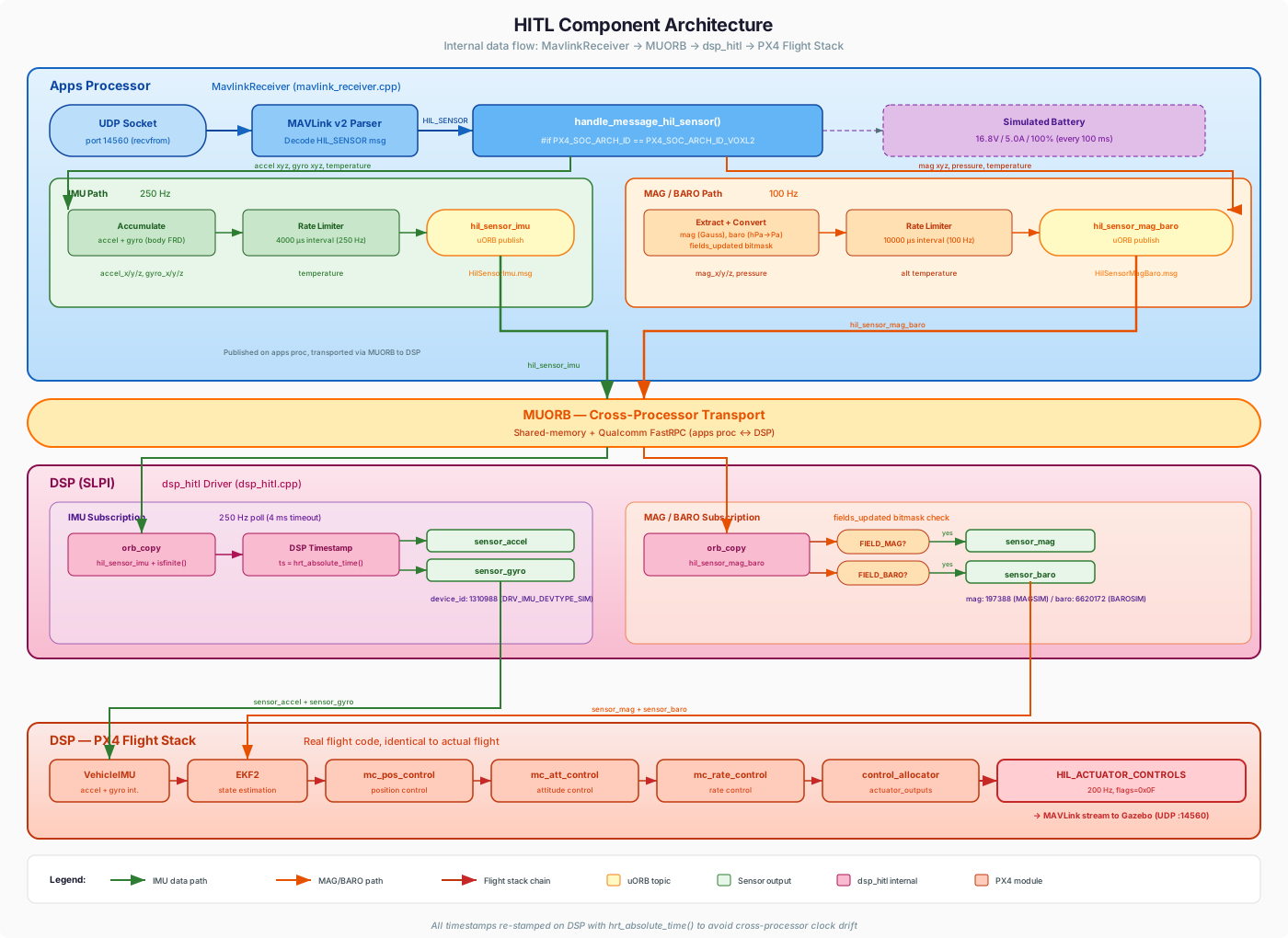
MavlinkReceiver
The PX4 MAVLink receiver running on the apps processor. VOXL2-specific code (gated by #if PX4_SOC_ARCH_ID == PX4_SOC_ARCH_ID_VOXL2) handles the HIL sensor bridging:
- Decodes
HIL_SENSORmessages and splits into two rate-decoupled uORB topics - Publishes a simulated battery status (16.8V, 5.0A, 100%) at 10 Hz
- Bridges
HIL_GPSto the standardsensor_gpstopic
voxl-hitl-vio-server
A standalone service that receives MAVLink ODOMETRY messages on UDP port 14570, extracts pose/velocity/covariance data, and publishes to MPA pipes hitl_vio and hitl_vio_extended. The pipe name hitl_vio (instead of qvio) avoids conflict with the real voxl-qvio-server and matches what voxl-vision-hub expects when en_hitl=true.
Data extracted from ODOMETRY:
- Position (x, y, z)
- Orientation (quaternion -> rotation matrix)
- Linear velocity (vx, vy, vz)
- Angular velocity (rollspeed, pitchspeed, yawspeed)
- Pose and velocity covariance diagonals
Configuration (/etc/modalai/voxl-hitl-vio-server.conf):
| Parameter | Default | Description |
|---|---|---|
receiver_ip | 0.0.0.0 | Bind address for UDP socket (0.0.0.0 = all interfaces) |
receiver_port | 14570 | UDP port to listen on (14570 avoids conflict with primary HIL port 14560) |
voxl-vision-hub
When configured with en_hitl=true, the vision hub subscribes to the hitl_vio MPA pipe (instead of qvio) and runs its VFC (Vision Flight Controller) control loop during simulation.
Configuration (/etc/modalai/voxl-vision-hub.conf):
{
    "en_vio": false,
    "vio_pipe": "qvio",
    "en_hitl": true,
    "offboard_mode": "vfc"
}
en_hitl: true— activates the HITL VIO path in state_manager (subscribes tohitl_viopipe)offboard_mode: "vfc"— enables the VFC offboard controller
Target-Side Components (DSP / SLPI)
dsp_hitl Driver
The DSP-side HITL shim driver. Polls at 250 Hz for incoming hil_sensor_imu and hil_sensor_mag_baro topics via MUORB and republishes them as native sensor topics with fresh DSP timestamps.
| Subscribed Topic | Published Topics | Rate |
|---|---|---|
hil_sensor_imu | sensor_accel, sensor_gyro | 250 Hz |
hil_sensor_mag_baro (FIELD_MAG) | sensor_mag | 50 Hz |
hil_sensor_mag_baro (FIELD_BARO) | sensor_baro | 10 Hz |
Device IDs (must match calibration parameters):
| Sensor | Device ID | Device Type |
|---|---|---|
| Accelerometer / Gyroscope | 1310988 | DRV_IMU_DEVTYPE_SIM |
| Magnetometer | 197388 | DRV_MAG_DEVTYPE_MAGSIM |
| Barometer | 6620172 | DRV_BARO_DEVTYPE_BAROSIM |
PX4 Flight Stack
The standard PX4 flight stack runs on the DSP: sensors -> EKF2 -> mc_pos_control -> mc_att_control -> mc_rate_control -> control_allocator. The DSP has no awareness that sensor data originates from simulation.
uORB Message Definitions
Two custom uORB messages transport HIL sensor data from the apps processor to the DSP via MUORB.
HilSensorImu
uint64 timestamp                # time since system start (microseconds)
float32[3] accelerometer_m_s2   # acceleration in body FRD frame (m/s^2)
float32[3] gyroscope_rad_s      # angular velocity in body FRD frame (rad/s)
float32 temperature             # temperature (Celsius)
HilSensorMagBaro
uint64 timestamp                # time since system start (microseconds)
float32[3] magnetometer_ga      # magnetic field in body FRD frame (Gauss)
float32 pressure_pa             # absolute pressure (Pa)
float32 temperature             # temperature (Celsius)
uint8 fields_updated            # bitmask: bit 0 = mag, bit 1 = baro
uint8 FIELD_MAG = 1
uint8 FIELD_BARO = 2
These messages are conditionally compiled: ModalAI boards include HilSensorImu.msg and HilSensorMagBaro.msg while removing OrbTestMedium.msg to stay within the uint8_t ORB_ID enum limit (256 topics).
Startup Sequence
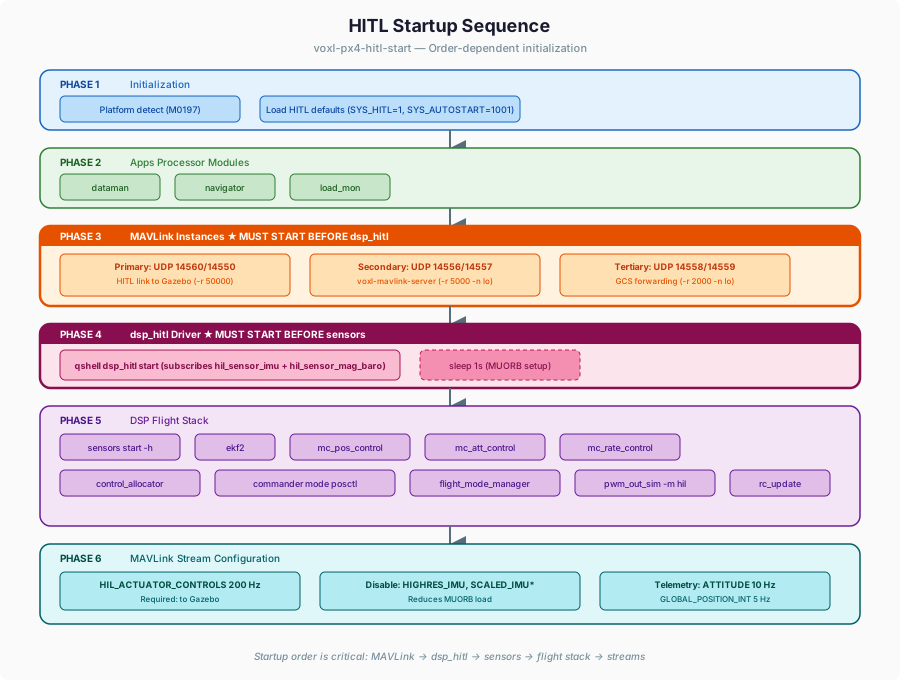
The HITL startup order is critical. MAVLink must be running before dsp_hitl starts, and dsp_hitl must be running before the sensors module starts.
Start Script (under the hood flow)
1. Platform detection (M0052 / M0054 / M0104 / M0197)
2. Load HITL default parameters (if first boot)
3. Start apps-proc modules: dataman, navigator, load_mon
4. Start MAVLink instances:
   ├─ Primary   (UDP 14560/14550) — HITL link to Gazebo
   ├─ Secondary (UDP 14556/14557) — voxl-mavlink-server
   └─ Tertiary  (UDP 14558/14559) — GCS forwarding
5. Start dsp_hitl on DSP: qshell dsp_hitl start
6. Wait 1 second (allow MUORB subscriptions to establish)
7. Start sensors on DSP: qshell sensors start -h
8. Start flight stack on DSP: ekf2, controllers, commander
9. Configure MAVLink streams:
   ├─ HIL_ACTUATOR_CONTROLS at 200 Hz (to Gazebo)
   ├─ Disable HIGHRES_IMU, SCALED_IMU (reduce MUORB load)
   └─ Low-rate telemetry: ATTITUDE 10 Hz, GLOBAL_POSITION_INT 5 Hz
Network Configuration
All communication uses UDP over the USB-Ethernet link between the host PC and VOXL2/M0197. No FTDI cable is required.
Port Allocation
| Port | Direction | Protocol | Purpose |
|---|---|---|---|
| 14560 | Host -> VOXL2/M0197 | MAVLink v2 | HIL_SENSOR, HIL_GPS |
| 14560 | VOXL2/M0197 -> Host | MAVLink v2 | HIL_ACTUATOR_CONTROLS (200 Hz) |
| 14570 | Host -> VOXL2/M0197 | MAVLink v2 | ODOMETRY / VIO pose (250 Hz) |
| 14556 | VOXL2/M0197 localhost | MAVLink v2 | voxl-mavlink-server (onboard) |
| 14558 | VOXL2/M0197 localhost | MAVLink v2 | GCS forwarding |
Connection Methods
Option A: ADB Port Forwarding
adb forward tcp:14560 tcp:14560
adb forward tcp:14570 tcp:14570
Set VOXL2_USB_IP in world SDF to 127.0.0.1. The hitl-gz-start.sh script handles this automatically.
Option B: Direct USB-Ethernet IP
# On VOXL2, find USB network IP:
adb shell ifconfig
# Default VOXL2 USB IP is usually 192.168.101.2 on HOST SIDE
Set VOXL2_USB_IP in world SDF to the discovered IP.
HITL Default Parameters
The HITL parameter configuration (voxl-px4-hitl-set-default-parameters.config) sets PX4 parameters optimized for simulation. Key categories:
System
| Parameter | Value | Purpose |
|---|---|---|
SYS_AUTOSTART | 1001 | Generic quadcopter airframe |
SYS_HITL | 1 | Enable HITL mode globally |
IMU_GYRO_RATEMAX | 800 | High IMU processing rate |
Sensor Calibration
All calibration offsets are zero and scales are 1.0 (identity) since simulated sensors produce ideal data. Device IDs must match the dsp_hitl driver:
| Parameter | Value | Matches |
|---|---|---|
CAL_ACC0_ID | 1310988 | DRV_IMU_DEVTYPE_SIM |
CAL_GYRO0_ID | 1310988 | DRV_IMU_DEVTYPE_SIM |
CAL_MAG0_ID | 197388 | DRV_MAG_DEVTYPE_MAGSIM |
EKF2
| Parameter | Value | Purpose |
|---|---|---|
EKF2_GPS_CHECK | 0 | Disable GPS quality gates |
EKF2_HGT_REF | 1 | GPS as height reference |
EKF2_MAG_TYPE | 1 | Heading-only mag fusion |
EKF2_MAG_CHECK | 0 | Disable mag strength validation |
EKF2_BARO_CTRL | 1 | Enable barometer fusion |
EKF2_GPS_CTRL | 7 | Full GPS fusion (lon/lat/alt/vel) |
Arming (Relaxed for Simulation)
| Parameter | Value | Purpose |
|---|---|---|
CBRK_SUPPLY_CHK | 894281 | Bypass supply voltage check |
CBRK_IO_SAFETY | 22027 | Bypass IO safety switch |
COM_ARM_MAG_STR | 0 | Disable mag strength gate |
COM_ARM_EKF_POS | 1.0 | Relaxed EKF position threshold |
COM_ARM_EKF_VEL | 1.0 | Relaxed EKF velocity threshold |
Control Allocation (X500 Geometry)
The rotor positions match the physical x500 frame at +/-0.174m offset:
| Motor | Position (X, Y) | Direction | KM |
|---|---|---|---|
| 0 (Front-Right) | +0.174, +0.174 | CCW | +0.05 |
| 1 (Back-Left) | -0.174, -0.174 | CCW | +0.05 |
| 2 (Front-Left) | +0.174, -0.174 | CW | -0.05 |
| 3 (Back-Right) | -0.174, +0.174 | CW | -0.05 |
Quick Start Guide
Prerequisites
Host PC
- Ubuntu 24.04
- Gazebo Jetty (gz-sim 10):
sudo apt install gz-jetty - MAVLink v2 C headers installed to
/usr/include/mavlink/ - USB cable to VOXL2/M0197
VOXL2/M0197
- Latest SDK (1.6.2 or newer recommended)
voxl-fpv-px4built with HITL supportvoxl-hitl-vio-serverinstalled (if using VFC)
Step-by-Step
1. Install Gazebo Jetty (Host)
Follow the official install guide at https://gazebosim.org/docs/jetty/install_ubuntu/ or:
sudo apt-get update
sudo apt-get install curl lsb-release gnupg

sudo curl https://packages.osrfoundation.org/gazebo.gpg --output /usr/share/keyrings/pkgs-osrf-archive-keyring.gpg
echo "deb [arch=$(dpkg --print-architecture) signed-by=/usr/share/keyrings/pkgs-osrf-archive-keyring.gpg] https://packages.osrfoundation.org/gazebo/ubuntu-stable $(lsb_release -cs) main" | sudo tee /etc/apt/sources.list.d/gazebo-stable.list > /dev/null
sudo apt-get update
sudo apt-get install gz-jetty
2. Install Build Dependencies (Host)
sudo apt-get install \
    build-essential \
    cmake \
    libboost-system-dev \
    libboost-thread-dev \
    libboost-filesystem-dev \
    libeigen3-dev \
    libprotobuf-dev \
    protobuf-compiler \
    libgz-sim-dev \
    libgz-plugin-dev \
    libgz-sensors-dev \
    libgz-msgs-dev \
    libgz-cmake3-dev
3. Install MAVLink C Headers (Host)
# Clone MAVLink with pymavlink submodule
git clone https://github.com/mavlink/mavlink.git --recursive

# Install pymavlink dependencies
pip3 install --break-system-packages -r mavlink/pymavlink/requirements.txt

# Generate C headers for the development dialect
cd mavlink
python3 -m pymavlink.tools.mavgen \
    --lang=C \
    --wire-protocol=2.0 \
    --output=generated/include/mavlink/v2.0 \
    message_definitions/v1.0/development.xml

# (OPTIONAL) Install system-wide
sudo cp -r generated/include/mavlink /usr/include/
cd ..
Verify: ls /usr/include/mavlink/v2.0/common/mavlink.h
4. Build Gazebo Plugins (Host)
cd px4-gz-jetty-plugins
mkdir -p build && cd build
cmake ..
make -j$(nproc)
This produces build/libmavlink_hitl_gazebosim.so and build/libtrajectory_rc_gazebosim.so.
Or via Docker:
docker build -t px4-gz-jetty-plugins .
docker create --name tmp px4-gz-jetty-plugins
docker cp tmp:/artifacts/. ./build/
docker rm tmp
5. Build and Deploy voxl-hitl-vio-server (Target)
cd voxl-hitl-vio-server
voxl-docker -i voxl-cross
# Inside docker:
./install_build_deps.sh $BOARD_SOC dev
./build.sh $BOARD_SOC
./make_package.sh
exit
# RUN THE FOLLOWING OUTSIDE OF THE DOCKER CONTAINER --(DEPENDING ON PERMISSIONS)
./deploy_to_voxl.sh
6. Build and Deploy voxl-fpv-px4 (Target)
cd voxl-fpv-px4
./run_docker.sh
./build.sh
./make_package.sh
# RUN THE FOLLOWING OUTSIDE OF THE DOCKER CONTAINER --(DEPENDING ON PERMISSIONS)
./deploy_to_voxl.sh
7. Configure VOXL2/M0197 Services
On the VOXL2/M0197, configure voxl-hitl-vio-server (/etc/modalai/voxl-hitl-vio-server.conf):
{
    "receiver_ip": "0.0.0.0",
    "receiver_port": 14570
}
Configure voxl-vision-hub (/etc/modalai/voxl-vision-hub.conf):
{
    "en_vio": false,
    "vio_pipe": "qvio",
    "en_hitl": true,
    "offboard_mode": "vfc"
}
8. Connect VOXL2/M0197
Connect the VOXL2/M0197 via USB-C. Verify connectivity:
ping 192.168.101.2
# or use ADB:
adb devices
9. Start PX4 HITL on VOXL2/M0197
# Terminal 1
adb shell
voxl-px4-hitl start

# Terminal 2
# Start VIO server and vision hub
adb shell
systemctl start voxl-hitl-vio-server
systemctl start voxl-vision-hub
10. Launch Gazebo on Host
cd px4-gz-jetty-plugins

# With ADB port forwarding (default, VOXL2/M0197 connected via USB)
./scripts/hitl-gz-start.sh

# With direct USB network IP
./scripts/hitl-gz-start.sh -i 192.168.101.2

# With trajectory automation
./scripts/hitl-gz-start.sh -i 192.168.101.2 -t /path/to/trajectory.json
The script:
- Sets
GZ_SIM_SYSTEM_PLUGIN_PATHto the plugin build directory - Sets
GZ_SIM_RESOURCE_PATHto include PX4 vehicle models (x500_voxl) - Substitutes the VOXL2/M0197 IP into the world file’s
VOXL2_USB_IPplaceholder - Sets up
adb forward tcp:14570 tcp:14570if using localhost - Launches
gz simwith the HITL world
Or manually:
export GZ_SIM_SYSTEM_PLUGIN_PATH=/path/to/px4-gz-jetty-plugins/build
export GZ_SIM_RESOURCE_PATH=/path/to/voxl-fpv-px4/px4-firmware/Tools/simulation/gz/models
gz sim worlds/hitl_x500.sdf -v 4
11. Verify
On the VOXL2/M0197 PX4 shell after the startup HIL script runs:
px4> qshell dsp_hitl status
Expected output showing incrementing counters:
Running: yes
=== IMU Section ===
  HIL sensor_imu received: 12453
  IMU updates published: 12450
  Current accel (x,y,z): -0.257, 0.151, -9.859
  Current gyro (x,y,z): -0.006, -0.001, 0.000
=== MAG/BARO Section ===
  HIL sensor_mag_baro received: 4980
  MAG updates published: 4975
  BARO updates published: 995
Verify VIO data: (Regular VOXL shell)
voxl-inspect-pipes
# Look for "hitl_vio" pipe with data
voxl-inspect-vio hitl_vio
12. Test Flight (PX4 shell)
px4> qshell commander arm
px4> qshell commander takeoff
# Observe vehicle in Gazebo
px4> qshell commander land
Verification
Phase 1: Host-side only (no VOXL2 needed)
# Terminal 1: start gz-sim
cd px4-gz-jetty-plugins
./scripts/hitl-gz-start.sh

# Terminal 2: listen for ODOMETRY on port 14570
python3 -c "
import socket
sock = socket.socket(socket.AF_INET, socket.SOCK_DGRAM)
sock.bind(('0.0.0.0', 14570))
while True:
    data, addr = sock.recvfrom(1024)
    print(f'Received {len(data)} bytes from {addr}')
"
You should see packets arriving at ~250 Hz.
Phase 2: Target-side pipeline
- Start
voxl-hitl-vio-serveron VOXL2 - Send ODOMETRY from host via gz-sim
- Verify
hitl_vioMPA pipe has data:voxl-inspect-pipeson VOXL2
Phase 3: Full closed-loop
- Start PX4 HITL on VOXL2 (
voxl-px4-hitl start) - Start gz-sim on host (
hitl-gz-start.sh) - Verify VFC engages when RC channels are in range
- Test position hold — drone should hover stably
Gazebo Version Compatibility
This plugin stack is configured for Gazebo Jetty (gz-sim 10.x). The CMakeLists.txt uses unversioned cmake package names (gz-sim, gz-plugin, gz-sensors), which is the convention for Gazebo Jetty/Ionic.
For older Gazebo versions, update px4-gz-jetty-plugins/CMakeLists.txt:
| Gazebo Version | gz-sim | gz-plugin | gz-sensors | gz-msgs |
|---|---|---|---|---|
| Garden | gz-sim7 | gz-plugin2 | gz-sensors7 | gz-msgs9 |
| Harmonic | gz-sim8 | gz-plugin2 | gz-sensors8 | gz-msgs10 |
| Ionic | gz-sim9 | gz-plugin3 | gz-sensors9 | gz-msgs11 |
| Jetty | gz-sim (10) | gz-plugin (4) | gz-sensors (10) | gz-msgs (12) |
For versioned releases (Garden/Harmonic/Ionic), use versioned find_package() calls and target names (e.g., gz-sim8::gz-sim8).
Headless / Remote Operation
Gz Sim can run fully headless for CI/automated testing:
gz sim -s -r <world.sdf> # server-only, no GUI, start running
Troubleshooting
Vehicle does not arm
- Verify
dsp_hitl statusshows increasing counters - Check EKF2 is fusing:
listener estimator_statuson PX4 shell - Ensure sensor device IDs match calibration parameters
- Check
commander statusfor preflight check failures
No sensor data received
- Verify Gazebo is running and not paused (WorldControl widget)
- Check UDP connectivity:
netstat -un | grep 14560 - Verify MAVLink instance is running:
mavlink statuson PX4 shell - Ensure
hitl-gz-start.shresolved the correct VOXL2 IP
Motors not spinning in Gazebo
- Verify
HIL_ACTUATOR_CONTROLSstream is configured at 200 Hz - Check
msg.flags = 0x0Fis set (VOXL2 quad bitmask) - Ensure the x500_voxl model does not have
<robotNamespace/>tags in motor plugins
VIO not working
- Verify
voxl-hitl-vio-serveris running:systemctl status voxl-hitl-vio-server - Check MPA pipe:
voxl-inspect-pipesshould showhitl_vio - Verify
voxl-vision-hubhasen_hitl=truein config
HIL Params not updating:
- Remove HIL params on /data/px4/param directory
- (Caution)
cd /data/px4/param && rm hitl*
# Now run again
voxl-px4-hitl
References
- PX4 HITL Documentation
- Gazebo Sim Documentation
- ModalAI VOXL2 Documentation
- VOXL PX4 System Architecture