AOI Yaw Tracking


Table of contents
Summary
What
- voxl-nano-tracker is a headless object-tracking service for VOXL devices that uses the NanoTrack/NCNN tracker and OpenCV (with optional OpenCL GPU acceleration) available in SDK 1.6.3+.
Inputs
- subscribes to camera frames via MPA pipes (configurable camera pipe).
Processing
- pre-processes frames (undistort/resize/color convert)
- runs the NCNN-based tracker, computes object offset (yaw correction) and tracking ROI; supports calibration (use_cal) and OpenCL for speed.
Outputs
- publishes camera frames and metadata/ROIs via MPA pipes and sends object_tracking_data_t (yaw offset, timestamp, sequence) for downstream consumers.
Config
- runtime options live in
/etc/modalai/voxl-nano-tracker.conf(camera pipe, ROI size, rates, debug, etc.).
Usage
In order to enable voxl-nano-tracker to run on boot, run the following:
voxl-configure-nano-tracker factory_enable
The generated config file lives at /etc/modalai/voxl-nano-tracker.conf and has the following default settings:
{
	"camera_pipe_name":	"hires_misp_color",
	"yaw_rate":	0.25,
	"yaw_accel":	2,
	"xy_rate":	1,
	"forward_vel":	0.5,
	"z_vel":	0.5,
	"min_track_size":	950,
	"roi_size_x":	150,
	"roi_size_y":	150,
	"neutral_border":	5,
	"min_sensitivity":	8,
	"dewarp_as_needed":	0,
	"track_valid_objects_only":	1,
	"en_debug":	false,
	"ai_pipe_name": "mobilenet_tflite_data"
}
Each setting can be tweaked to fit the user’s application.
In order to enable AOI yaw tracking in flight the user must be in VFC position mode (VIO) and it must be enabled in /etc/modalai/voxl-vision-hub.conf as a VFC (VOXL Flight Controller) sub-mode.
The relevant config options are below:
"tracking_trigger_ch":	12,
"tracking_trigger_ch_thresh_temp":	1200,
"tracking_trigger_ch_thresh_new":	1800,
The user can choose which RC channel is used to start tracking (default: 12) as well as the channel value threshold.
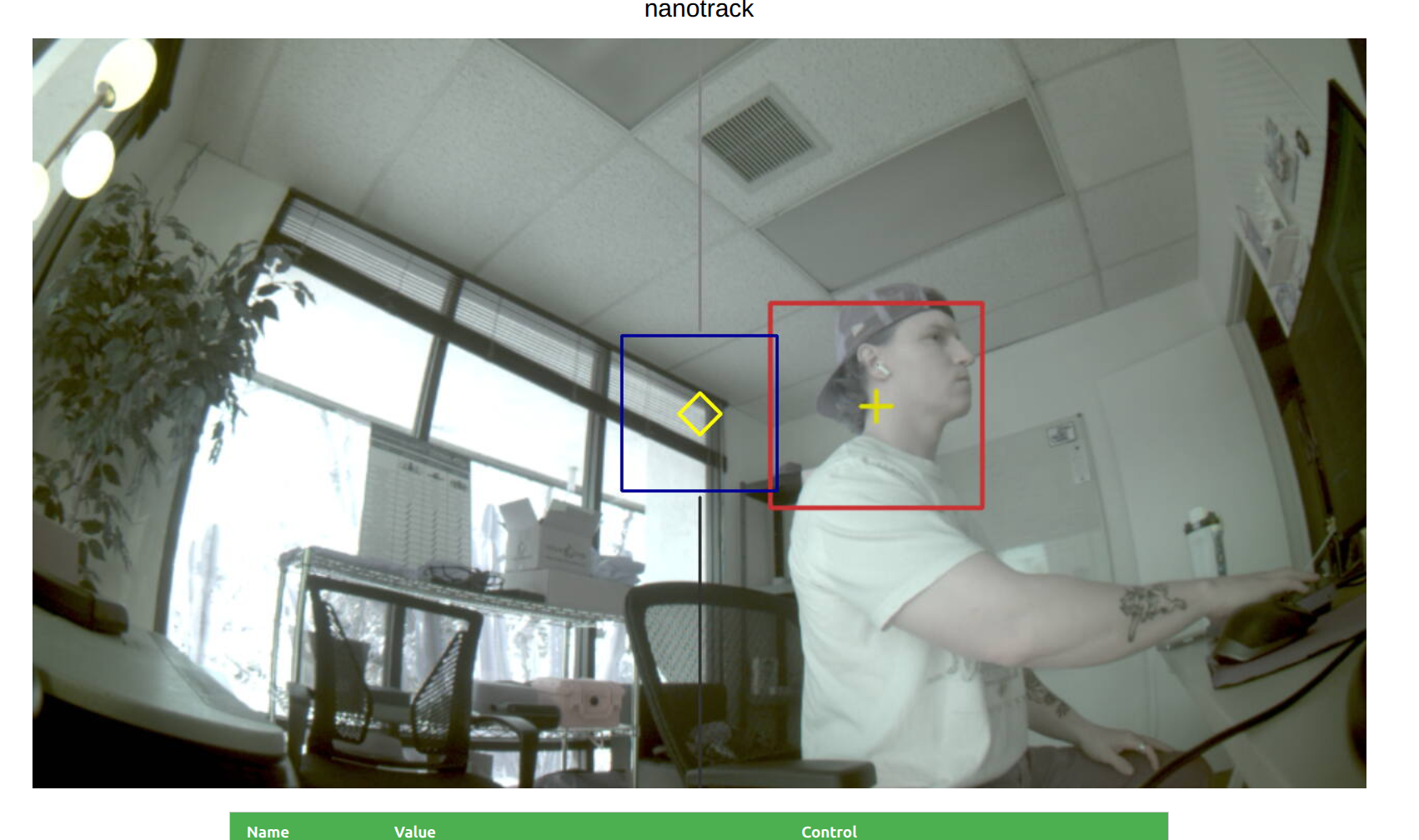
voxl-portal
AOI Yaw tracking can also be started, stopped, and reset via voxl-portal
voxl-vtx
Yaw Tracking AOI, crosshairs, target, etc. can also be transmitted via voxl-vtx and rendered directly onto user’s screen via voxl-vrx.
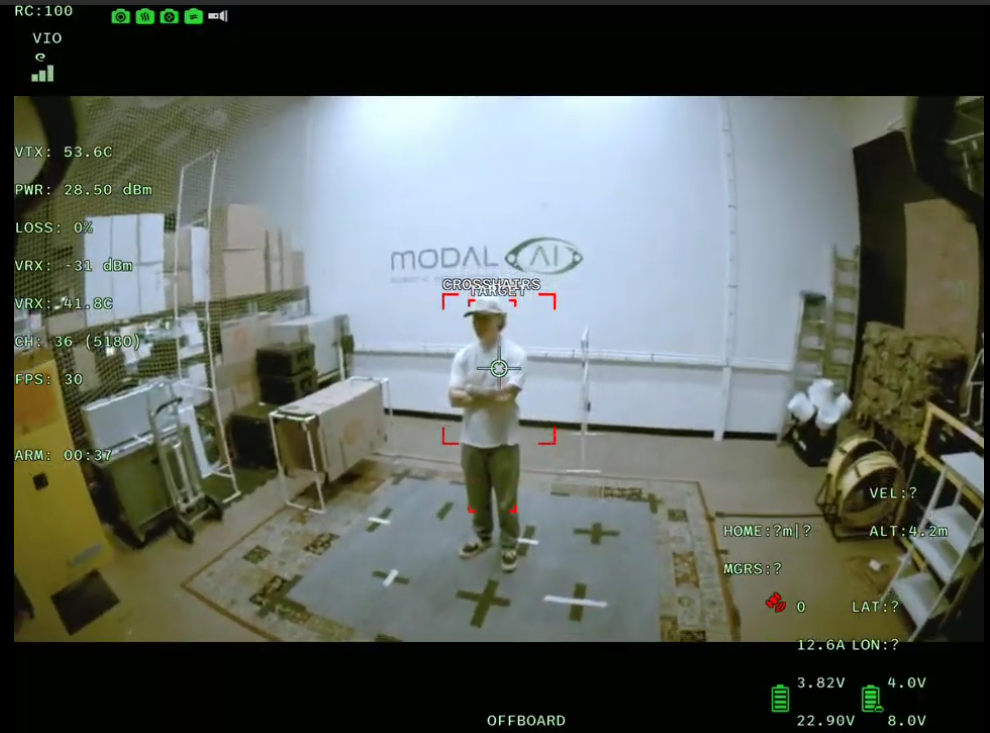
In order to enable this, users can modify /etc/modalai/voxl-vtx.conf, enable ai_detection_enable, and set ai_detection_source to that of voxl-nano-tracker (object_tracker_meta)
{
    "name": "Default",
    "mcs": 0,
    "mtu": 1000,
    "power": 1000,
    "source": "hires_default_misp_encoded",
    "invert_toggle": -1,
    "joystick_toggle": -1,
    "ai_detection_enable": true,
    "ai_detection_source": "object_tracker_meta",
    "ai_detection_qty": 3,
    "ai_detection_threshold": 0.5
}
voxl-tflite-server integration
Summary
voxl-nano-tracker can integrate directly with voxl-tflite-server (TFLite inference service) to receive object detections and use them to seed or re-acquire the tracker.
Configuration
The MPA pipe name to listen for TFLite detections is configurable via the ai_pipe_name setting in /etc/modalai/voxl-nano-tracker.conf. The default value is mobilenet_tflite_data.
Behavior
When connected to the TFLite server pipe, voxl-nano-tracker will parse ai_detection_t packets and build a list of candidate ROIs. By default the service filters detections for the classes person and car with confidence > 0.7 and only accepts detections whose area is between min_track_size and a large fraction of the frame size.
Scaling: incoming detection coordinates are scaled to the tracker’s input size before use.
Reacqusition: if tracking is lost and detections meeting the filter/size criteria are available, the tracker will automatically begin a reacquire/seed sequence using the TFLite ROIs.
Notes and tuning
- Adjust
ai_pipe_nameif your TFLite server publishes on a different pipe. - Tune
min_track_sizeand the detection thresholds in your TFLite model to control which detections are used to seed tracking. - The tracker also exposes
track_valid_objects_onlyand other parameters in the config file to change filtering behavior.
This integration allows running a lightweight detector (voxl-tflite-server) to provide ROIs for the NanoTrack tracker, improving robustness and enabling automatic target acquisition.